






-
AUDIO VIDEO PROCESSING, SETUP & ENVIRONMENTOfficial REW (Room EQ Wizard) Support Forum Audiolense User Forum Calibration Equipment Auto-EQ Platforms / Immersive Audio Codecs Video Display Technologies / Calibration AV System Setup and Support Listening Room / Home Theater Build Projects Room Acoustics and Treatments AV Showcase Movies / Music / TV / Streaming
-
AUDIO VIDEO DISCUSSION / EQUIPMENTHome Theater / Audio and Video - Misc Topics Essence For Hi Res Audio AV Equipment Advice and Pricing Awesome Deals and Budget AV Equipment AV Receivers / Processors / Amps UHD / Blu-ray / CD Players / Streaming Devices Two Channel Hi-Fi Equipment DIY Audio Projects Computer Systems - HTPC / Gaming HD and UHD Flat Screen Displays Projectors and Projection Screens AV Accessories Buy - Sell - Trade
Navigation
Install the app
How to install the app on iOS
Follow along with the video below to see how to install our site as a web app on your home screen.
Note: This feature may not be available in some browsers.
More options
You are using an out of date browser. It may not display this or other websites correctly.
You should upgrade or use an alternative browser.
You should upgrade or use an alternative browser.
V5.20.14 early access build
- Thread starter John Mulcahy
- Start date

- Status
- Not open for further replies.

And besides, the program to create a passive crossover behaves inadequately. So I've been wanting to come up with something for a long time. You and John made me practice with the EQ and I did it. Here is the original, dirty measurement and the new, clean one. Thanks again.Although they are not audible, it will cause switching phases between left and right speakers and measurements will show random peaks or dips at 50Hz which is annoying.
Attachments
greatadrian
New Member
- Joined
- Sep 4, 2017
- Posts
- 24
Hi @John Mulcahy,
Two questions from my side:
Is it possible to allow for longer measurement names? Often during an import these will be trimmed to 26 or so characters. I know it's not a trivial task since this might affect backwards compatibility of mdat files and cause some nasty graphical issues with legend in All SPL graph, etc.
A minor graphical thing - on MacOS (with the latest 5.20.14 version) the left sidebar sometimes goes underneath the graph and the icons are inaccessible. Clicking "collapse" twice doesn't change a thing.
Two questions from my side:
Is it possible to allow for longer measurement names? Often during an import these will be trimmed to 26 or so characters. I know it's not a trivial task since this might affect backwards compatibility of mdat files and cause some nasty graphical issues with legend in All SPL graph, etc.
A minor graphical thing - on MacOS (with the latest 5.20.14 version) the left sidebar sometimes goes underneath the graph and the icons are inaccessible. Clicking "collapse" twice doesn't change a thing.
Attachments
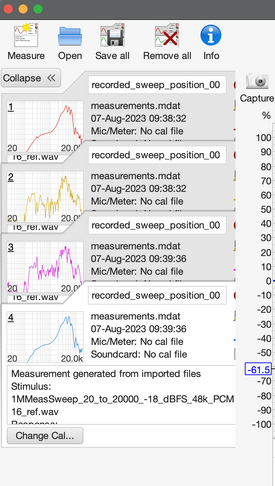
I use the new "dB + phase average" feature to average left and right speakers, it gets rid of the phase ground loop related dips in the vector average.And besides, the program to create a passive crossover behaves inadequately. So I've been wanting to come up with something for a long time. You and John made me practice with the EQ and I did it. Here is the original, dirty measurement and the new, clean one. Thanks again.
What Mac hardware and OS version are you running when you see this problem? What's the screen resolution setting? Have you changed any of the font settings in REW's View preferences? I don't see this issue on various different Macs running Catalina to the latest Sonoma developer beta.A minor graphical thing - on MacOS (with the latest 5.20.14 version) the left sidebar sometimes goes underneath the graph and the icons are inaccessible. Clicking "collapse" twice doesn't change a thing.
gadzooks
New Member
- Joined
- Jul 27, 2023
- Posts
- 7
More
- Preamp, Processor or Receiver
- Rowen PA1, Schiit Freya+, Adcom
- Main Amp
- Folsom Designed 7293 Chip amp
- Additional Amp
- McIntosh MC 7270
- Other Amp
- Rotel 5 channel that is collecting dust
- DAC
- Topping D90, Schitt Gungnir
- Computer Audio
- Roon with Raspberry PI, Linn Majik
- Universal / Blu-ray / CD Player
- Something from Sony
- Streaming Equipment
- Nvidia Shield, Roku
- Streaming Subscriptions
- Too many, need to cancel some
- Front Speakers
- GR Research NX-Treme
- Subwoofers
- GR Research Triple Open Baffle subs
- Other Speakers
- Old School B&W 801 (second gen), Witte and Rohrig
- Screen
- Cheap
- Video Display Device
- Projector
- Remote Control
- Too many to mention
- Other Equipment
- Parks Audio tube and solid state phono stages. Pioneer Direct Drive Turntable
When I tried 2M measurements, 1/A worked, so I think you are on to something.mdat is not attached, must be over file size limit.
I can't see anything wrong in the info windows. 4M measurements might be causing some memory issues (wild guess). You'll need to wait for John .
Love the results BTW, and love the work John has put into REW. Thank you both!

John Mulcahy
REW Author
Thread Starter
- Joined
- Apr 3, 2017
- Posts
- 9,638
That's odd. Does it correct if you change the window size a little?on MacOS (with the latest 5.20.14 version) the left sidebar sometimes goes underneath the graph and the icons are inaccessible
Managed to get an "Out of bounds java exception" when aggressively pressing "cross corr align" to align 2 measurement EP versions (they kept moving, too)
REW V5.20.14 running Azul Systems, Inc. JRE 1.8.0_372 64-bit on Windows 10 Locale: language en, keyboard GB, windows-1252 at 96 DPI
REW V5.20.14 running Azul Systems, Inc. JRE 1.8.0_372 64-bit on Windows 10 Locale: language en, keyboard GB, windows-1252 at 96 DPI
Message:
java.lang.ArrayIndexOutOfBoundsException: 18064
Stack Trace:
18064
roomeqwizard.MeasData.phase(y:7806)
roomeqwizard.eD.C(y:2573)
roomeqwizard.VI.B(y:1276)
roomeqwizard.GJ.A(y:783)
roomeqwizard.HK.D(y:12)
roomeqwizard.RJ.A(y:981)
roomeqwizard.RJ.paintComponent(y:674)
javax.swing.JComponent.paint(JComponent.java:1056)
javax.swing.JComponent.paintChildren(JComponent.java:889)
javax.swing.JComponent.paint(JComponent.java:1065)
javax.swing.JLayeredPane.paint(JLayeredPane.java:586)
javax.swing.JComponent.paintChildren(JComponent.java:889)
javax.swing.JComponent.paint(JComponent.java:1065)
javax.swing.JLayer.paint(JLayer.java:433)
javax.swing.plaf.LayerUI.paint(LayerUI.java:79)
javax.swing.plaf.ComponentUI.update(ComponentUI.java:161)
javax.swing.JComponent.paintComponent(JComponent.java:780)
javax.swing.JLayer.paint(JLayer.java:428)
javax.swing.JComponent.paintChildren(JComponent.java:889)
javax.swing.JComponent.paint(JComponent.java:1065)
javax.swing.JComponent.paintChildren(JComponent.java:889)
javax.swing.JComponent.paint(JComponent.java:1065)
javax.swing.JComponent.paintToOffscreen(JComponent.java:5210)
javax.swing.RepaintManager$PaintManager.paintDoubleBuffered(RepaintManager.java:1579)
javax.swing.RepaintManager$PaintManager.paint(RepaintManager.java:1502)
javax.swing.RepaintManager.paint(RepaintManager.java:1272)
javax.swing.JComponent._paintImmediately(JComponent.java:5158)
javax.swing.JComponent.paintImmediately(JComponent.java:4969)
javax.swing.JLayer.paintImmediately(JLayer.java:415)
javax.swing.plaf.LayerUI.paintImmediately(LayerUI.java:717)
javax.swing.JLayer.paintImmediately(JLayer.java:410)
javax.swing.JComponent.paintImmediately(JComponent.java:4950)
javax.swing.RepaintManager$4.run(RepaintManager.java:831)
javax.swing.RepaintManager$4.run(RepaintManager.java:814)
java.security.AccessController.doPrivileged(Native Method)
java.security.ProtectionDomain$JavaSecurityAccessImpl.doIntersectionPrivilege(ProtectionDomain.java:74)
javax.swing.RepaintManager.paintDirtyRegions(RepaintManager.java:814)
javax.swing.RepaintManager.paintDirtyRegions(RepaintManager.java:789)
javax.swing.RepaintManager.prePaintDirtyRegions(RepaintManager.java:738)
javax.swing.RepaintManager.access$1200(RepaintManager.java:64)
javax.swing.RepaintManager$ProcessingRunnable.run(RepaintManager.java:1732)
java.awt.event.InvocationEvent.dispatch(InvocationEvent.java:311)
java.awt.EventQueue.dispatchEventImpl(EventQueue.java:758)
java.awt.EventQueue.access$500(EventQueue.java:97)
java.awt.EventQueue$3.run(EventQueue.java:709)
java.awt.EventQueue$3.run(EventQueue.java:703)
java.security.AccessController.doPrivileged(Native Method)
java.security.ProtectionDomain$JavaSecurityAccessImpl.doIntersectionPrivilege(ProtectionDomain.java:74)
java.awt.EventQueue.dispatchEvent(EventQueue.java:728)
java.awt.EventDispatchThread.pumpOneEventForFilters(EventDispatchThread.java:205)
java.awt.EventDispatchThread.pumpEventsForFilter(EventDispatchThread.java:116)
java.awt.EventDispatchThread.pumpEventsForHierarchy(EventDispatchThread.java:105)
java.awt.EventDispatchThread.pumpEvents(EventDispatchThread.java:101)
java.awt.EventDispatchThread.pumpEvents(EventDispatchThread.java:93)
java.awt.EventDispatchThread.run(EventDispatchThread.java:82)
java.lang.ArrayIndexOutOfBoundsException: 18064
Stack Trace:
18064
roomeqwizard.MeasData.phase(y:7806)
roomeqwizard.eD.C(y:2573)
roomeqwizard.VI.B(y:1276)
roomeqwizard.GJ.A(y:783)
roomeqwizard.HK.D(y:12)
roomeqwizard.RJ.A(y:981)
roomeqwizard.RJ.paintComponent(y:674)
javax.swing.JComponent.paint(JComponent.java:1056)
javax.swing.JComponent.paintChildren(JComponent.java:889)
javax.swing.JComponent.paint(JComponent.java:1065)
javax.swing.JLayeredPane.paint(JLayeredPane.java:586)
javax.swing.JComponent.paintChildren(JComponent.java:889)
javax.swing.JComponent.paint(JComponent.java:1065)
javax.swing.JLayer.paint(JLayer.java:433)
javax.swing.plaf.LayerUI.paint(LayerUI.java:79)
javax.swing.plaf.ComponentUI.update(ComponentUI.java:161)
javax.swing.JComponent.paintComponent(JComponent.java:780)
javax.swing.JLayer.paint(JLayer.java:428)
javax.swing.JComponent.paintChildren(JComponent.java:889)
javax.swing.JComponent.paint(JComponent.java:1065)
javax.swing.JComponent.paintChildren(JComponent.java:889)
javax.swing.JComponent.paint(JComponent.java:1065)
javax.swing.JComponent.paintToOffscreen(JComponent.java:5210)
javax.swing.RepaintManager$PaintManager.paintDoubleBuffered(RepaintManager.java:1579)
javax.swing.RepaintManager$PaintManager.paint(RepaintManager.java:1502)
javax.swing.RepaintManager.paint(RepaintManager.java:1272)
javax.swing.JComponent._paintImmediately(JComponent.java:5158)
javax.swing.JComponent.paintImmediately(JComponent.java:4969)
javax.swing.JLayer.paintImmediately(JLayer.java:415)
javax.swing.plaf.LayerUI.paintImmediately(LayerUI.java:717)
javax.swing.JLayer.paintImmediately(JLayer.java:410)
javax.swing.JComponent.paintImmediately(JComponent.java:4950)
javax.swing.RepaintManager$4.run(RepaintManager.java:831)
javax.swing.RepaintManager$4.run(RepaintManager.java:814)
java.security.AccessController.doPrivileged(Native Method)
java.security.ProtectionDomain$JavaSecurityAccessImpl.doIntersectionPrivilege(ProtectionDomain.java:74)
javax.swing.RepaintManager.paintDirtyRegions(RepaintManager.java:814)
javax.swing.RepaintManager.paintDirtyRegions(RepaintManager.java:789)
javax.swing.RepaintManager.prePaintDirtyRegions(RepaintManager.java:738)
javax.swing.RepaintManager.access$1200(RepaintManager.java:64)
javax.swing.RepaintManager$ProcessingRunnable.run(RepaintManager.java:1732)
java.awt.event.InvocationEvent.dispatch(InvocationEvent.java:311)
java.awt.EventQueue.dispatchEventImpl(EventQueue.java:758)
java.awt.EventQueue.access$500(EventQueue.java:97)
java.awt.EventQueue$3.run(EventQueue.java:709)
java.awt.EventQueue$3.run(EventQueue.java:703)
java.security.AccessController.doPrivileged(Native Method)
java.security.ProtectionDomain$JavaSecurityAccessImpl.doIntersectionPrivilege(ProtectionDomain.java:74)
java.awt.EventQueue.dispatchEvent(EventQueue.java:728)
java.awt.EventDispatchThread.pumpOneEventForFilters(EventDispatchThread.java:205)
java.awt.EventDispatchThread.pumpEventsForFilter(EventDispatchThread.java:116)
java.awt.EventDispatchThread.pumpEventsForHierarchy(EventDispatchThread.java:105)
java.awt.EventDispatchThread.pumpEvents(EventDispatchThread.java:101)
java.awt.EventDispatchThread.pumpEvents(EventDispatchThread.java:93)
java.awt.EventDispatchThread.run(EventDispatchThread.java:82)
Attachments
Last edited by a moderator:
John Mulcahy
REW Author
Thread Starter
- Joined
- Apr 3, 2017
- Posts
- 9,638
Builds updated today (ea70) with these changes:
- Added: JRULTR subwoofer equaliser option
- Changed: The positions of the Measurement actions, Trace arithmetic and Alignment tool dialogs are remembered for the next startup
- Changed: Relax measurement SNR signal-to-noise warning threshold from 30 dB to 20 dB
- Changed: Another attempt to improve UMIK-1 detection on Linux
- Changed: Add "Fit Y to data" support for Clarity and RT60 graphs
- Changed: When alignment tool gains are adjusted the traces of the corresponding measurement are shifted
- Changed: Removed the measurement A delay control from the Alignment tool
- Changed: Provided coarse and fine delay sliders for the Alignment tool measurement B delay with a total range of +/- 1000 ms
- Changed: Provided coarse and fine offset sliders for the Offset t=0 adjustment on the SPL & Phase and Group Delay graphs and increased range to +/- 100 ms
- Fixed: Individual input voltage calibrations were not saved to measurements, the calibration for input 0 was used for all inputs
- Fixed: Array index out of bounds could occur when performing operations on multiple smoothed measurements
John Mulcahy
REW Author
Thread Starter
- Joined
- Apr 3, 2017
- Posts
- 9,638
Builds updated today (ea71) with these changes:
- Fixed: Switching from Java driver to ASIO driver for a multi-input device could sometimes cause a concurrent modification exception
- Fixed: Button to show graph scroll bars was missing
The Alignment tool seems to cause REW to hang on my Macbook Pro. It's using a lot of CPU power, and when I try to use the top menu REW becomes Not Responding in the Activity Monitor. I'm using the ea70 build. The macOS is Ventura 13.5. Any idea what could be wrong?
John Mulcahy
REW Author
Thread Starter
- Joined
- Apr 3, 2017
- Posts
- 9,638
That's a bit of self-contradiction in JavaSound. It includes the headphone port in the list of available audio devices but when it is asked to provide a name for the device it is saying actually the device isn't available after all, probably because it doesn't have anything plugged into it. I'll suppress the error.I've had the attached exception occur a couple of times now
John Mulcahy
REW Author
Thread Starter
- Joined
- Apr 3, 2017
- Posts
- 9,638
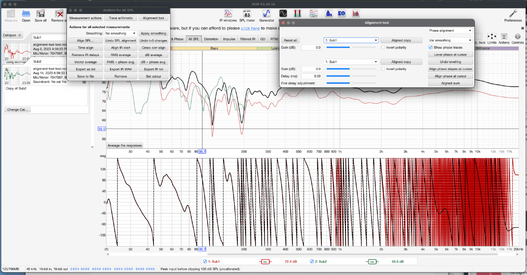
Can you attach an mdat file with the two measurements you are trying to align and attach a screenshot of the alignment tool setup before the hang occurs, please? What is the alignment frequency?The Alignment tool seems to cause REW to hang on my Macbook Pro.
In the help menu there is an option to generate a diagnostic file, please also attach the file that produces.
OK, here is an mdat with two measurements, and a screenshot at the point where REW is starting to hang. Unfortunately, the Help menu is also unresponsive, so no diagnostic files can be generated at this point. The selected frequency is 100 Hz, if it matters.Can you attach an mdat file with the two measurements you are trying to align and attach a screenshot of the alignment tool setup before the hang occurs, please? What is the alignment frequency?
In the help menu there is an option to generate a diagnostic file, please also attach the file that produces.
Attachments
John Mulcahy
REW Author
Thread Starter
- Joined
- Apr 3, 2017
- Posts
- 9,638
Builds updated today (ea72) with this change:
- Fixed: Alignment tool would hang if a measurement being aligned had unwrapped phase
John Mulcahy
REW Author
Thread Starter
- Joined
- Apr 3, 2017
- Posts
- 9,638
Thanks, there was an issue with the handling of measurements with unwrapped phase. It has been fixed in ea72.here is an mdat with two measurements
Hi John,
I use the latest 5-20-14
I am a little confused about the operation done in this mdat:
the first graph is a meassurement
the second one a target
the third is a smoothed exported version of graph 1, reimported
the 4th is graph 2 divided by graph 3
the 5th is the result of graph 1 versus graph 4
question: since graph 4 has no IR, shouldn't it be minimum phase in a arithmetic operation? the phase of graph 5 makes no sense to me.
I use the latest 5-20-14
I am a little confused about the operation done in this mdat:
the first graph is a meassurement
the second one a target
the third is a smoothed exported version of graph 1, reimported
the 4th is graph 2 divided by graph 3
the 5th is the result of graph 1 versus graph 4
question: since graph 4 has no IR, shouldn't it be minimum phase in a arithmetic operation? the phase of graph 5 makes no sense to me.
also when I create a MP version of that filter in order to force an IR, the sum of the measurement with that doesn't have an IR. It does have a phase though. when I click on "generate MP" in GD suddenly the IR appears but the phase is changed (near linear phase) likewise the example above.
John Mulcahy
REW Author
Thread Starter
- Joined
- Apr 3, 2017
- Posts
- 9,638
The imported data had magnitude and phase, those are used in trace arithmetic for that measurement.since graph 4 has no IR, shouldn't it be minimum phase in a arithmetic operation?
John Mulcahy
REW Author
Thread Starter
- Joined
- Apr 3, 2017
- Posts
- 9,638
They are at different sample rates. The measurement is 44.1 kHz, A over B is 48 kHz. If the sample rates are not related by an integer the arithmetic will use magnitude and phase values.also when I create a MP version of that filter in order to force an IR, the sum of the measurement with that doesn't have an IR
@John Mulcahy not sure if it is a bug or a feature and if it is a bug, if it has been reported.
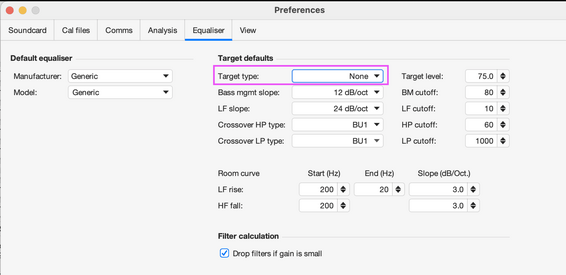
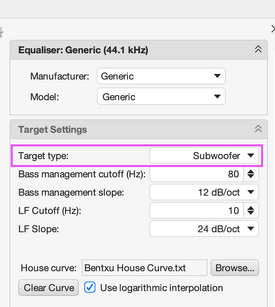
When I set "Target Type" to "None" in "EQ Preferences" and then want to EQ with a generic EQ, it sets the target to Subwoofer. Needs to be changed every time. It does not seem to be picking up the Target Type preference.
Details in the attached files.
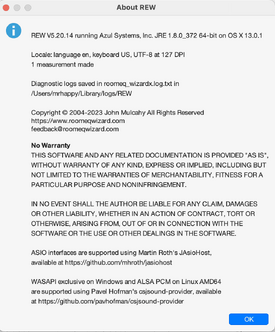
REW v5.20.14
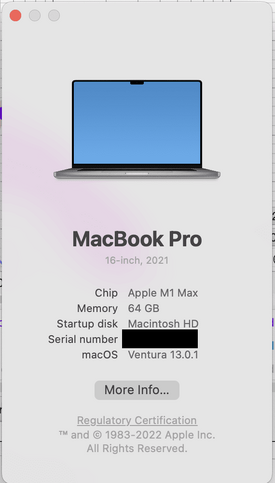
2020 16" MacBook Pro 64 GB on Ventura 13.0.1


When I set "Target Type" to "None" in "EQ Preferences" and then want to EQ with a generic EQ, it sets the target to Subwoofer. Needs to be changed every time. It does not seem to be picking up the Target Type preference.
Details in the attached files.
REW v5.20.14
2020 16" MacBook Pro 64 GB on Ventura 13.0.1
John Mulcahy
REW Author
Thread Starter
- Joined
- Apr 3, 2017
- Posts
- 9,638
Works as intended for me. The default target type in the Equaliser preferences is used for new measurements. Changing the default will not affect the target type for any existing measurements.When I set "Target Type" to "None" in "EQ Preferences" and then want to EQ with a generic EQ, it sets the target to Subwoofer.
Got this exception doing from-file measurements with latest build:
REW V5.20.14 running Azul Systems, Inc. JRE 1.8.0_382 64-bit on Windows 10 Locale: language en, keyboard US, windows-1252 at 96 DPI
Message:
java.lang.RuntimeException: called `Option::unwrap()` on a `None` value
Stack Trace:
called `Option::unwrap()` on a `None` value
com.cleansine.sound.provider.SimpleMixer.nGetAvailBytes(Native Method)
com.cleansine.sound.provider.SimpleDataLine.available(SimpleDataLine.java:292)
roomeqwizard.D.A(y:4270)
roomeqwizard.DF.run(y:3065)
REW V5.20.14 running Azul Systems, Inc. JRE 1.8.0_382 64-bit on Windows 10 Locale: language en, keyboard US, windows-1252 at 96 DPI
Message:
java.lang.RuntimeException: called `Option::unwrap()` on a `None` value
Stack Trace:
called `Option::unwrap()` on a `None` value
com.cleansine.sound.provider.SimpleMixer.nGetAvailBytes(Native Method)
com.cleansine.sound.provider.SimpleDataLine.available(SimpleDataLine.java:292)
roomeqwizard.D.A(y:4270)
roomeqwizard.DF.run(y:3065)
- Status
- Not open for further replies.




Popular tags
20th century fox
4k blu-ray
4k uhd
4k ultrahd
action
adventure
animated
animation
bass
blu-ray
calibration
comedy
comics
denon
dirac
dirac live
disney
dolby atmos
drama
fantasy
hdmi 2.1
home theater
horror
kaleidescape
klipsch
lionsgate
marantz
movies
onkyo
paramount
pioneer
rew
romance
sci-fi
scream factory
shout factory
sony
stormaudio
subwoofer
svs
terror
thriller
uhd
ultrahd
ultrahd 4k
universal
value electronics
warner
warner brothers
well go usa