REW Beta Release REW API beta releases

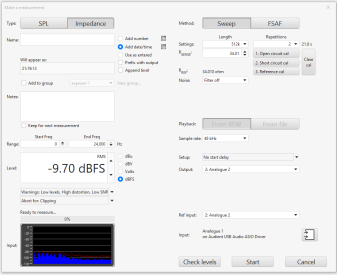
John, after the second impedance calibration step, the level value becomes -3.01 dB. Although before that I set -9.7 dB in the measurement window, and took the first calibration step.
I guess the level was -3 before you changed it to -9.7? I have fixed it for the next build.
 
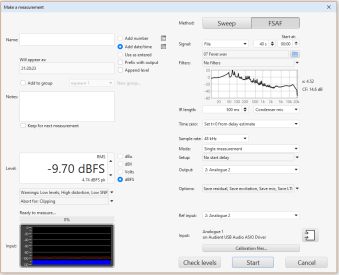
There was once an issue that the measurement window took a long time to load due to the FSAF setting, even if the FSAF tab was not used. In the latest versions, the measurement window does not allow me to do anything for 10 seconds after opening. Similar to what it was before.
 
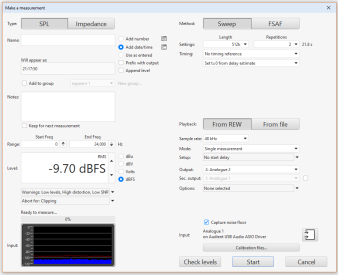
Doesn't give me much to work with. Every time you open the Measure dialog or only the first time? What are your Measure dialog settings for SPL, FSAF and Impedance? Anything else you can say about when this happens?
 
This only happens the first time after running REW. All subsequent openings of the slowdown window are not present. Should I take screenshots of the settings of the three tabs?
 
Settings for three tabs.
 

Attachments

  • FSAF.PNG
    FSAF.PNG
    53.5 KB · Views: 49
  • Impedance.PNG
    Impedance.PNG
    48.5 KB · Views: 49
  • SPL.PNG
    SPL.PNG
    48.9 KB · Views: 49
How long is the FSAF file? Does the Measure dialog open in FSAF mode when you get the delay or is it in SPL mode? Is there a Busy indicator shown during the delay?
 
FSAF file length is 35 MB. The delay appears with all three tabs with which REW was closed. But on the SPL and Impedance tab there is no delay indicator; a small window appears and disappears very quickly, the text of which is not visible. There is a delay indicator on the FSAF tab; it starts to 'spin', freezes almost immediately, and remains like that until the end of the 'Measurement' tab freezing.
 
Builds updated today (beta 119) with these changes:
  • Added: German translations of the interface courtesy of Andreas Lartz
  • Added: The RTA has an option to show the hearing threshold when the Y axis is SPL
  • Added: The RTA distortion settings have a "Show note name" option to label the fundamental with the corresponding musical note
  • Added: prefboxlabels.properties and prefhints.properties have new entries for the RTA hearing threshold and RTA note name options
  • Added: API RTAAppearanceConfiguration has an entry for showing the hearing threshold
  • Added: API RTADistortionConfiguration has an entry for showing the note name
  • Added: The main window title bar shows when the API server is running
  • Changed: Revised FSAF file handling to reduce delays when opening the Measure dialog
  • Changed: Implemented a faster resampler for FSAF files
  • Fixed: Audio inputs and outputs with Cyrillic characters were displayed incorrectly
  • Fixed: Sweep level may not be properly saved and restored when making impedance calibration measurements
 
The info popup window evidently displays the data for the "current selection" which is the from the last action taken, measurement, open, change current selection, etc. It took a while for me to figure that out while I was in the Overlays window. I at first thought that it would be for the last one that I highlighted before clicking the Info icon, similar to a right click of one that shows options for that particular item. I don't know what other use is made for the current selection, but it would be helpful to have an option in the right-click option window to display Info for that option rather than having to make it the current selection, then click Info. With many measurements in the main window or overlays, checking information on a measurement, such as date/time, sweep info, etc., is a bit slow and cumbersome. Could you add an Info option to the right click option window, maybe just below the "Make this the current selection" option? This is just a convenience, but when opening a previously saved file that has many measurement items it would make it much easier to scan for info among the items.

 
You can double click a measurement to make it the current selection, and use the Alt+up/down arrow keys to make the next or previous measurement the current selection.
 
You can double click a measurement to make it the current selection, and use the Alt+up/down arrow keys to make the next or previous measurement the current selection.
Ah yes, and I see that with the Info popup open that hot key also moves the Info through the measurements as well. Thanks. Very nice. Much better than my idea.
 
Back
Top