REW Beta Release REW API beta releases

If you are on a Mac they often have a different channel allocation. If not, make sure the HDMI cable is not too long, that can cause slips in the channel data.
 
If you are on a Mac they often have a different channel allocation. If not, make sure the HDMI cable is not too long, that can cause slips in the channel data.
I have Windows 10 PC. 1 meter cable. In Windows speaker setup, 7.1 test tones playback from correct channels. And also in REW, channels are correct if I use "reset channel mapping". But REW's displayed PCM channel numbers don't follow the standard where SL should be ch 5, SR ch 6. Is this a Windows thing or REW?

 
Displayed where?
map.webp
 
I have Windows 10 PC. 1 meter cable. In Windows speaker setup, 7.1 test tones playback from correct channels. And also in REW, channels are correct if I use "reset channel mapping". But REW's displayed PCM channel numbers don't follow the standard where SL should be ch 5, SR ch 6. Is this a Windows thing or REW?

I had the exact same problem as long as I was with Win10. Now in Win 11 I have the same 5.1 system and I can choose channel 5-6 or 7-8 for surrounds (if this help!)
The weird thing is with Win 10 or Win 11 if REW is open with the receiver disconnected, Front left and Front right name return to L and R ( G et D en fran¸ais) but surrounds remains aG and aD...
 
I had the exact same problem as long as I was with Win10. Now in Win 11 I have the same 5.1 system and I can choose channel 5-6 or 7-8 for surrounds (if this help!)
The weird thing is with Win 10 or Win 11 if REW is open with the receiver disconnected, Front left and Front right name return to L and R ( G et D en fran¸ais) but surrounds remains aG and aD...
Fixed the issue and order by using mapping like this.

rewfix.png
 
REW v5.40 Beta 114 running Eclipse Adoptium JRE 11.0.29 64-bit on OS X 26.2.
I am changing trace colors on the All SPL graph. I use the trace colour button in the measurement panel right click menu. I save the file and exit. When I re-open REW, it has lost the color changes and goes back to the defaults. It was not behaving this way with Beta 112 or 113. In fact I opened a file created with 113 and it still has the color changes that I made. However, whenever I open any file and go to the All SPL graph, nothing is displayed. I have to actively select different measurements to make them appear. This too is a behavior that was not happening before.

How do I ensure that the color changes "stick"?
 

Attachments

  • 1769666358000.png
    1769666358000.png
    29 KB · Views: 7
Do you have "Save trace colours with measurement" selected in the View preferences?
No, that option was not selected. I even stared at that View preferences screen real hard last night before I asked my question. When I saw that setting, I assumed that it was associated with something that happens during the measurement action so I didn't test it. Because it says "with measurement". For my brain, it would be more intuitive if it said "Override default trace colors upon save".

In fact, I wonder why this is even an option that has to be turned on. Are there a lot of use cases where the user wants to re-open a file later and have all their previous color editing disappear?

As a counterpoint, the graph remembers and saves the line "Trace Options" under the Controls menu. There seems to be a different design philosophy here because it retains the setting and I don't have to go to View Preferences and check a box that says something like "Save Trace Options with measurement".

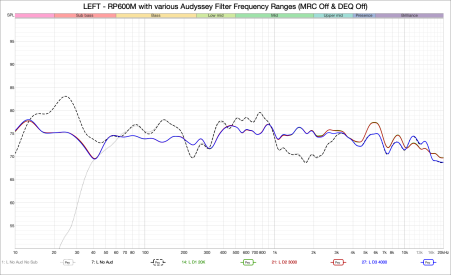
Either way, it works now and I have attached a copy of the graph.

Next, is there a setting that will retain the All SPL view that was saved when I re-open the file? As noted in my previous post, the All SPL graph is completely blank when I re-open the file and I have to click each measurement again for anything to display. It's not a huge deal, but when trying to go back to where I left off and working with a large number of measurements (there are 32 in this file) it's an annoyance.

I realize I am griping. On the other hand nothing improves without user feedback. Please know that I do appreciate this software and your willingness to help people like myself that know just enough to screw something up. 😊
 

Attachments

  • Left RP-600M Aud Filter Frequency Ranges.png
    Left RP-600M Aud Filter Frequency Ranges.png
    140.7 KB · Views: 7
whenever I open any file and go to the All SPL graph, nothing is displayed. I have to actively select different measurements to make them appear.
As noted in my previous post, the All SPL graph is completely blank when I re-open the file and I have to click each measurement again for anything to display.

In the 'All SPL' tab, click the first measurement, press '⌘-a' on the keyboard. All measurements are now selected.
 
Are there a lot of use cases where the user wants to re-open a file later and have all their previous color editing disappear?
Yes. For example, loading several files with a few measurements each with the "Save trace colour with measurement" option can mean many traces end up with the same colour. Just because an option doesn't fit your workflow doesn't mean that's the only workflow. That's why there are options.

the All SPL graph is completely blank when I re-open the file and I have to click each measurement again for anything to display
That's a bug, I've fixed it for the next build. The selections when the file was last saved should be restored when it is loaded.
 
I just installed REW V5.40 beta 114 after using V5.31.3 until yesterday, and I'm trying to get used to the differences in usability.
However, I can't figure out how to change the smoothing for all tracks at once. I've looked in the Preferences tab and elsewhere, but the only way I've found to do this is via the Graph menu at the top, but the desired smoothing is only applied to the selected track in the left column, indicated by a small vertical blue bar.
What am I missing?
Ettore
 
I don't know how to thank you enough! I tried every option with the right mouse button, but never directly on an overlay graph, and I was going crazy...

Can I ask you another question? For some time now, when I run sweeps in REW, I've often gotten more or less loud crackling noises superimposed on the sweep. This has happened with both my previous AVR (Arcam AVR20) and my current one (Marantz Cinema 30), both with W10 and after updating to W11. I've used different HDMI cables, uninstalled and then updated REW, reinstalled ASIO4ALL, and then installed and used FLEXASIO.
Of course, I've updated all my laptop's drivers, and I don't know what else to try. The crackling noises come and go seemingly randomly. Sometimes just exiting and re-entering REW is enough, while other times it takes restarting the laptop or trying repeatedly. What could be the cause? Could my laptop's HDMI output be having some kind of hardware problem (It only happens to me with REW sweeps. It has never happened during Dirac - or Audyssey - equalization)?
Ettore

 
Hi John!

I have a question: is it possible to use the REW API to switch the frequency axis of the RTA (or measurement) graph between log-scaled and linear-scaled?

i.e. I want to press this button using REW API:

1769937940976.png


It seems like there might be a way to do it in the measurement results window (though I'm still trying to figure out how to make that work).

It seems that if I wanted a log scale graph, that the workaround would be to save the current RTA graph, save measurement file, and then reload measurement file with ?ppo=96 appended to the URL.

Is there an equivalent option for ppo=96 to load the data as a linear-spaced graph?

Thank you!
 
Last edited:
No, the API doesn't have any endpoints to select or configure graphs. The axis choice is per-graph and independent of the data being displayed. You could perhaps inject key codes to activate the appropriate keyboard shortcuts.
 
Builds updated today (beta 115) with these changes:
  • Changed: Add the smoothing setting to the notes for saved RTA measurements
  • Fixed: Overlay selections when file was saved were not restored when the file was next loaded
 
Hi John, thank you for your suggestion!

I have another question regarding the API: Is it possible to use the API to capture the main graph window? Similar to how we have the image capture for RTA?

Currently what I’m doing is to just get the frequency response data from the plots using measurement ID and graphing it myself, but I’m wondering if there’s a way to use the REW image capture so all my graphs look consistent. I guess I could also just save the RTA graph to the main window, extract the data from there and also plot them myself, but the REW graph window looks really nice (and is widely recognized too!)

Also, do you have plans to add more functionality to the API in the future? If so, I have a bunch of suggestions on things that would be nice to use the API for.
 
Dear John, finally a Java exception after a long time :)

I was exporting multiple IRs as wav, was trying to export 256k sample length for measurements of length 128k and there was a warning for sub response not having a sample at t=0 just before the exception error. Here's the log:


REW V5.40 Beta 115 running Eclipse Adoptium JRE 11.0.29 64-bit on Windows 10 Language en, country GB, keyboard GB, UTF-8 Screen 3840 x 1600 at 96 DPI Running in C:\Program Files\REW


Message:
java.lang.NullPointerException
Stack Trace:
roomeqwizard.components.E.A(y:5436)
roomeqwizard.components.E.C(y:3735)
roomeqwizard.components.E$41.actionPerformed(y:905)
java.desktop/javax.swing.AbstractButton.fireActionPerformed(AbstractButton.java:1967)
java.desktop/javax.swing.AbstractButton$Handler.actionPerformed(AbstractButton.java:2308)
java.desktop/javax.swing.DefaultButtonModel.fireActionPerformed(DefaultButtonModel.java:405)
java.desktop/javax.swing.DefaultButtonModel.setPressed(DefaultButtonModel.java:262)
java.desktop/javax.swing.AbstractButton.doClick(AbstractButton.java:369)
java.desktop/javax.swing.plaf.basic.BasicMenuItemUI.doClick(BasicMenuItemUI.java:977)
java.desktop/javax.swing.plaf.basic.BasicMenuItemUI$Handler.mouseReleased(BasicMenuItemUI.java:1021)
java.desktop/java.awt.Component.processMouseEvent(Component.java:6635)
java.desktop/javax.swing.JComponent.processMouseEvent(JComponent.java:3342)
java.desktop/java.awt.Component.processEvent(Component.java:6400)
java.desktop/java.awt.Container.processEvent(Container.java:2263)
java.desktop/java.awt.Component.dispatchEventImpl(Component.java:5011)
java.desktop/java.awt.Container.dispatchEventImpl(Container.java:2321)
java.desktop/java.awt.Component.dispatchEvent(Component.java:4843)
java.desktop/java.awt.LightweightDispatcher.retargetMouseEvent(Container.java:4918)
java.desktop/java.awt.LightweightDispatcher.processMouseEvent(Container.java:4547)
java.desktop/java.awt.LightweightDispatcher.dispatchEvent(Container.java:4488)
java.desktop/java.awt.Container.dispatchEventImpl(Container.java:2307)
java.desktop/java.awt.Window.dispatchEventImpl(Window.java:2772)
java.desktop/java.awt.Component.dispatchEvent(Component.java:4843)
java.desktop/java.awt.EventQueue.dispatchEventImpl(EventQueue.java:772)
java.desktop/java.awt.EventQueue$4.run(EventQueue.java:721)
java.desktop/java.awt.EventQueue$4.run(EventQueue.java:715)
java.base/java.security.AccessController.doPrivileged(Native Method)
java.base/java.security.ProtectionDomain$JavaSecurityAccessImpl.doIntersectionPrivilege(ProtectionDomain.java:85)
java.base/java.security.ProtectionDomain$JavaSecurityAccessImpl.doIntersectionPrivilege(ProtectionDomain.java:95)
java.desktop/java.awt.EventQueue$5.run(EventQueue.java:745)
java.desktop/java.awt.EventQueue$5.run(EventQueue.java:743)
java.base/java.security.AccessController.doPrivileged(Native Method)
java.base/java.security.ProtectionDomain$JavaSecurityAccessImpl.doIntersectionPrivilege(ProtectionDomain.java:85)
java.desktop/java.awt.EventQueue.dispatchEvent(EventQueue.java:742)
java.desktop/java.awt.EventDispatchThread.pumpOneEventForFilters(EventDispatchThread.java:203)
java.desktop/java.awt.EventDispatchThread.pumpEventsForFilter(EventDispatchThread.java:124)
java.desktop/java.awt.EventDispatchThread.pumpEventsForHierarchy(EventDispatchThread.java:113)
java.desktop/java.awt.EventDispatchThread.pumpEvents(EventDispatchThread.java:109)
java.desktop/java.awt.EventDispatchThread.pumpEvents(EventDispatchThread.java:101)
java.desktop/java.awt.EventDispatchThread.run(EventDispatchThread.java:90)


The .mdat file is quite large but let me know if you need it. Btw, I cannot find an easy way to export multiple measured impulses and keep their relative peak times while starting all of them at the same time. I am having to export them as text with headers and comments and use start time info to pad zeros to basically get IR arrays of samples from the same set of measurements. In short I am trying to say, there could be an option to start all exports from t=0.
 
Last edited by a moderator:
I've sent you a link to a version that should fix the error. To preserve relative timing you can either choose the option to place t=0 at a specified sample index (provided t=0 is within the IR) or apply the same window to all the IRs (with the same reference time) and export the windowed IRs.
 
Here are some of my suggestions for API based on what I have been using, which is mainly the different generator settings, RTA, and measurement sweeps:
  • Get bit depth resolution of input and output (e.g. 16 bit or 24 bit)
  • Image capture from main window
  • Ability to select which curves are included for image capture (e.g. to de-select peak curves in RTA when doing image capture)
  • Control graph frequency axis (linear vs log scale) with the API
  • Obtain whether current graph axis is linear or log scaled with the API
  • Ability to fit graph’s y-axis to data
 
Last edited:
Back
Top