


REW Beta Release REW API beta releases

Hi John,

I often find that when measuring in highly reflective environment like inside the car cabin, it is difficult to align the impulse responses (IR) without eye-balling and manually aligning each one. It becomes very tedious if there are many measurements to align for the purposes of designing FIR filters with the currently available options (Time align, Align IR start and Cross corr align). It would be appreciated if you consider adding another option to align IRs based on a chosen impulse slope rise threshold of a certain percentage, say 10%, 20% or user adjustable.

Let me illustrate, below are screenshots where I try to align impulse response of sixteen measurements taken in the car with the microphone spaced 10 cm apart in a square horizontal plane. In the first 4 pictures, I have removed 13 measurements to illustrate the issue a bit more clearly.

Original IRs before alignment
Snap1.png


IRs after using Align IR start option
Snap2.png


IRs after using Cross corr align option
Snap3.png


IRs after using Time align option
Snap4.png


As shown above and below with all sixteen measurements enabled, using the Align IR start option seems to work well until I inspected the IRs more closely.


Snap5.png


The rise slopes of the IRs are slightly missaligned using Align IR start option.
Snap6.png


The option that appears to achieve what I needed was to individually align the IRs using their initial slope rise with the cursor placed at 10% and selecting the Set t=0 at cursor option. This produces the IR alignment shown below.

Snap7.png


I tried to upload the .mdat file but it is too large, here is the link https://drive.google.com/file/d/1GJGmGtm7zl-0I38dUFjqMk9joItNNW4_/view?usp=sharing
 
Last edited:
There are two factors at play. The first is that working out the IR start is difficult, particularly where the IRs have small fluctuations before what we would choose as the "correct" start. The second is that the IR start is determined by examining the raw data samples, so the precision is determined by the sample rate, leading to variations of 20 us or so for your 48 kHz data. When you manually set t=0 using the cursor you are interpolating between samples and achieve better precision. I am reluctant to change the algorithm, as impulse responses vary a lot and it is pretty reliable as it is. However, there is a way to reduce your manual effort. After doing the IR start align, change the IR windows for the responses to cover the rise they have in common at the start, for example you could set the left window to 0.1 ms, the ref time to 0 and the right window to 0.1 ms and use "Apply windows to all". You can then use the cross correlation alignment, which aligns the windowed data, to better align the responses. Remember to restore meaningful windows afterwards, of course.
 
That is a nifty trick and thanks for the suggestion; I tried it on a few measurements and it works well.

However on DSP processed measurements the suggested process does not work as intended. Below is the screenshot of sixteen measurements processed using FIR filters for a more linear phase response The process does not work well due to IRs containing acausal info. I had to eye ball the IRs as described in my previous post to align them before calculating the average respons using the RMS + phase avg. function.

An additional IR alignment option to achieve this could be beneficial and would be appreciated if you could consider it. For your refence, here is the link to the .mdat file of the IRs shown below, https://drive.google.com/file/d/1dxgNR-VHKWkkHkTNDZbupm-ZTAsL4E3M/view?usp=sharing.

Snap1.png
 
Builds updated today (beta 121) with these changes:
  • Added: The SPL meter now shows LCpeak in its minmax values, regardless of the meter weighting choice
  • Added: The SPL logger logs LCpeak
  • Changed: The macOS build uses Java 11u29 to maintain compatibility with 10.15
 
Hi

I notice that it is possible when "Export a measure as txt" that i can load it as a room curve for the EQ to EQ that it correct to other speaker measure FR . Only the Target Level (db SPL) work setting diffrent. if my measure is around 67 db and i have target level set to 60 db in EQ the room curce is around 130 db plot can see when scroll. target Level SPL need set to 0 to get around 67 db and - 7 db to get around 60 db

is this work as you want or can this work so when set target level to 67 db it is show at around 67 db ?
 
Builds updated today (beta 121) with these changes:
  • Added: The SPL meter now shows LCpeak in its minmax values, regardless of the meter weighting choice
  • Added: The SPL logger logs LCpeak
  • Changed: The macOS build uses Java 11u29 to maintain compatibility with 10.15
Thank you very much for the 10.15 compatibility!
 
Приветствую!!!
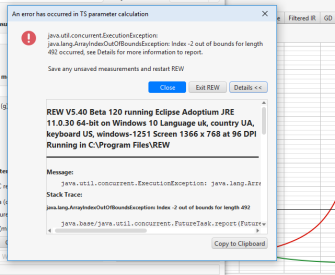
Как мне с этим бороться?
Заранее благодарю за помощь
 

Attachments

  • papandos.png
    papandos.png
    38.3 KB · Views: 28
That is a nifty trick and thanks for the suggestion; I tried it on a few measurements and it works well.

However on DSP processed measurements the suggested process does not work as intended. Below is the screenshot of sixteen measurements processed using FIR filters for a more linear phase response The process does not work well due to IRs containing acausal info. I had to eye ball the IRs as described in my previous post to align them before calculating the average respons using the RMS + phase avg. function.

An additional IR alignment option to achieve this could be beneficial and would be appreciated if you could consider it. For your refence, here is the link to the .mdat file of the IRs shown below, https://drive.google.com/file/d/1dxgNR-VHKWkkHkTNDZbupm-ZTAsL4E3M/view?usp=sharing.

View attachment 91453
Probably a bit tedious, but I've sometimes found it helpful to bandpass the response for timing. 500-2khz with Bessel 12dB/oct filters work great. Another trick I've used from time to time is FDW. The data is exceptionally messy though. YMMV.
 
Лучше всего было бы приложить размеры, чтобы я мог разобраться.
Относится ли это ко мне?
Если да, то какие именно размеры?
+++++++++++++++++++++
Does this apply to me?
If so, what sizes exactly?
 

Attachments

  • papandos2.png
    papandos2.png
    42.2 KB · Views: 18
Last edited:
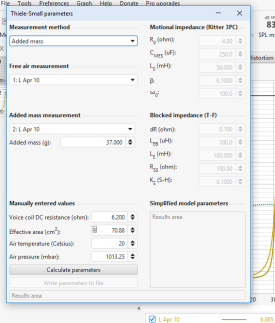
Thanks. You need to measure to a much higher frequency so that the impedance minimum after the peak can be located and the blocked impedance fit can be carried out. Measure to at least 2 kHz, preferably higher for a more accurate blocked impedance fit.
Edit: It would also be better to start the measurements at 10 Hz.
 
Builds updated today (beta 122) with these changes:
  • Added: In-app help has German translations courtesy of Andreas Lartz
  • Added: The measure.properties file has strings for the input selection dialog and multi-input averaging dialog
  • Changed: The SPL meter calibration dialog (showing the "Finished" button) is no longer modal
  • Fixed: Stepped THD vs frequency measurement plots ended at the last step within the graph span rather than filling the graph span
 
Builds updated today (beta 123) with these changes:
  • Added: The in-app preferences help is now available in Traditional Chinese (Taiwan)
  • Added: The API preferences have an option to start the API when REW starts
  • Added: There is an Analysis preferences option to "Use multiple cores", enabled by default. This enables use of multiple cores during calculations to speed up processing and has been the default in REW since V5.30, but it might lead to thermal throttling on systems with limited cooling, such as laptops, which might cause audio dropouts.
  • Fixed: In-app help table of contents fixed for French and German
  • Fixed: Typos in some properties files entries
 
Hi
I do left and right speaker measure and with RMS average the average calc is the same as with RMS+phase Avg and it look wrong in level, because it do not correct middle the dips. I use 1/48 resolution but the dips are large in 1/12 too

I choose the menu in all spl RMS Average and RMS +Phase avg so rew vreate the last 2 measures.
I like use the german version, but a problem is, when i want report something or ask, i need reinstall english version to show. or is it possible to switch inside REW the language. maybe with a REW restart so i need not install


rms average.jpg
 

Attachments

for the german version i notice only very small character error. in some menus stand kalabr but correct is Kalibr. german word is very simular to english word. only 1. letter is K in german instead C . maybe you find places best when search for Kalabr. and replace with Kalibr

kalibr.jpg


I thought because the RMS average stand on top of menu that RMS average is first choose. what average method does measure repeat do. RMS or db average ?

I try now db average and i can confirm it soud better. I also think have same EQ on left and right channel give best sound. when play a mono song it should sound in stereo wide very small. then it is correct. only ikmultimedia speaker correction allow switch to use same Eq on both speakers.
I notice when place the microphone 90 degree so the microphone point up(but same X Y Z, (i measure this good) results are also much noticicable better when 90 degree microphone pos is use. (and more simular to headphone). I have a beyerdynamic MM1 it have cal files for 90 degree and 0 degree. maybe it is because the microphone get less reflections from floor and desktop table in high freq. I can only suggest to all, test both there are many diffrences between 0 degree and 90 degree . I verifyy i use correct microphone cal files. thats the results

mic 90 degree 0 deg diffrence.jpg
 
seem RMS average have problems with low frequency. here can see on a larger band(20 hz) problem of RMS average. I guess repeatet measure also use RMS average, because i notice that 4 measurements did increase on higher freq the SNR good, but on very low freq it increase very few the SNR.

rms average (2).jpg
 
please look at this screenshot. the RMS average seem correct, i ask the google KI .it seem the db average is not correct. I use a measure and let create rew a copy of that measure and shift it -20 db.. so we look at the point where the original have 80 db , the copy 60 db. RMS Average (Energetischer Mittelwert): should be 77.03 which is correct in REW . the db average should be 70 db but it is in REW as 72,4 db show. see at 195 hz where the cursor is

db average.jpg


Back
Top