




REW Beta Release REW API beta releases

Builds updated today (beta 116) with these changes:
  • Added: API endpoint /measurements/:id/command has a "Scale IR" command to apply a dB gain figure to the impulse response data
  • Added: API has endpoints /audio/asio/format, /audio/java/format and /audio/input-bit-mask
  • Added: API has /application commands to save the main or overlay graphs to file or copy them to the clipboard
  • Added: API has /application commands to fit the main or overlay graph axes to the data
  • Added: API has /application commands to fit the main or overlay graph Y axis to the data
  • Added: API has /application endpoints to GET and POST the visibility of the main and overlay windows
  • Added: API has /application endpoints to GET, PUT and POST graph image saver settings for the main or overlay graphs
  • Added: API has /application endpoints to GET and POST the Y axis unit for the current main or overlay graphs
  • Added: API has /application endpoints to GET the Y axis unit choices for the current main or overlay graphs
  • Added: API has /application endpoints to GET and POST the graph limits for the current main or overlay graphs
  • Added: API has /application endpoints to GET and POST the cursor X position for the current main or overlay graphs
  • Added: API has /application endpoints to GET and POST the graph choice for the main or overlay graph windows
  • Added: API has /application endpoints to GET the graph choices for the main or overlay graph windows
  • Added: API has /application endpoints to GET and POST the frequency axis choice for the main or overlay graph windows
  • Added: API has /application endpoints to GET the frequency axis spacing choices for the main or overlay graph windows
  • Fixed: Exporting all IRs as WAV could throw an exception if t=0 was not within the range of the export
  • Fixed: The Impulse graph Scale IR gain was applied twice, shifting the SPL
  • Fixed: Measurement indices in the API could be wrong with grouped measurements (using UUID instead of index is recommended)
  • Fixed: Getting distortion data via the API for stepped level measurements could return incorrect data
 
Hello everyone,

Newbie question.

I have my REW 5.40 Beta 115 license and the server is activated.
I can see from Opera that REW is running and ready, so I can communicate.

However, I can't open the measurement window to start an automated measurement.

I tried with the following address ...//localhost:4735/measure

But nothing opens...
Am I using the wrong path?

I think so, since I don't see this address alone in Swagger!

Thanks for your help.

D.
 
However, I can't open the measurement window to start an automated measurement.
Measurements are run by POSTing to /measure/command, but a Pro upgrade is needed to POST to /measure endpoints, it is mainly used by manufacturers for automated test. You can make RTA measurements without the upgrade.
 
Hi,

I do have a Pro Upgrade license specifically to be able to control REW externally.

I can connect to the API server (opening the JSON, viewing the version, etc.), but when I send the request, it fails and I get an error message (via the browser's inspector) saying the function is not recognized.

Code:
index.html:414 POST http://localhost:4735/measurements 404 (Not Found)

I'm not a JavaScript coder, so I'm using Gemini for help (even though I'm starting to understand the code structure).

Code:
try {
        const res = await fetch(`${REW_URL}/measure/`, {
            method: 'POST',
            headers: { 'Content-Type': 'application/json' },
            body: JSON.stringify(payload)
        });
        return res.ok;
    } catch (e) {
        addLog("Erreur REW : " + e.message, "error");
        return false;
    }
}

So, should I use a POST request with /measure/command instead?

Thanks for your help.
D.
 
should I use a POST request with /measure/command instead?
Yes. Start by using the SwaggerUI by opening http://localhost:4735 in a browser, that way you can see all the /measure endpoints, the format of the messages and the responses. See below for an example starting an SPL measurement, endpoints are explained in the help.

1770888726992.png
 
Okay, I'm starting to understand the concept!

Is using the APIs a bit like a "ghost user" or is it done behind the scenes in REW?

D.
 
Builds updated today (beta 117) with these changes:
  • Added: Musway equaliser entries
  • Changed: Saving multiple inputs to individual measurements defaults to selected for new installations
  • Fixed: Merge B to A was not using measurement B window settings
  • Fixed: The level and linearity overlay graphs might not show traces depending on the X axis span
  • Fixed: The level meters panel units menu could be shown on right click even if the panel was behind another window
  • Fixed: IMD RTA measurements saved with V5.40 beta 115 or beta 116 are not compatible with earlier or later builds
  • Fixed: RTA graph captures made with a colour scheme that did not match the scheme being used had incorrect RTA trace colour
 
Hi everyone

I managed to get my interface working with REW for remote control.

I did quite a bit of testing with the Swagger to get the correct settings for the desired parameters, but now it works.

I'm going to move on to controlling the turntable.

Thanks John for the help and thanks for your work on REW.

D.

If you want to see what it looks like visually
 
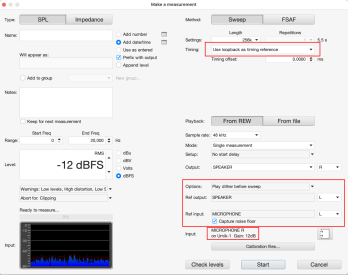
@John Mulcahy, I noticed this in the most recent build—it might be in earlier builds, also—and there is nothing in the change logs about this 'feature; how would the other 'channel' of what is essentially a mono mic be used as a loopback timing reference? How would the timing of the reference channel be different than the input channel if they are on the same ADC?

UMIK-1:

?hash=cd3195687003794979e248c1bf2c26ce.png


UMIK-2:

umik2.png
 

Attachments

  • umik1.png
    umik1.png
    279.1 KB · Views: 7
Either is fine.

OK - I'll post it here. The workaround might be useful if anyone else is experiencing the same.

I used Chat GPT to talk through diagnosis. The summary below has been created by Chat GPT based on the ongoing chat I had with it. However, any unsubstantiated statements from the AI, I have put in a quote box (I have no idea if they are accurate, or just plausible speculation presented as fact). If it is not in a quote box, then it is an accurate description of observations and actions I made/took.

****
Background
I am preparing/setting up to use REW together with a Motu Ultralite Mk 5 to take some measurements of an old CD player I have recently purchased. To make sure I understand how to use REW for this, I have set up my Motu with a loop back from output 1 to input 3. I am using REW generator to generate some test signals out of output 1 - which are fed back into input 3, and back to REW oscilloscope and RTA windows. However, I have been having problems with instability in the readings. For example, with a single 1kHz tone from the generator, the oscilloscope display sometimes glitches, and the RTA plot jumps up and down and never stabilises. Frequently when I start the oscilloscope, or RTA, I get "The soundcard failed to return data" (or similar) messages, and the generator stops. This is much worse at higher sample rates (set in both REW and Motu) Sometimes at 48kHz I can get stable operation, But at 96kHz it is never stable even if I can get past the "no data" message, and at 192khz I get nothing back at all.

Workaround
However, if I first start the Oscilloscope and/or RTA window, then start the generator I get stable operation at all sample rates.

If it helps I can create a screen video demonstrating the issue.

AI summary of the chat.

System

  • macOS Tahoe 26.3
  • Apple Silicon M2 Pro, 32GB Ram
  • MOTU UltraLite mk5 (firmware and drivers, latest from Jan 2026))
  • REW 5.40 beta (117)
  • Direct USB-C
  • External PSU for Motu
Observed behaviour:

If Generator is started first, then RTA/Scope:
  • Sometimes “soundcard did not provide input data”
  • Sometimes communication starts but RTA/Scope show glitches
  • More frequent at 96 kHz
  • Doesn't work at all at 192kHz
  • Occurs even with large buffers (256k or 512k)
  • Playing with buffer size seems to influence the frequency of glitching, but it has not been consistent engough to reach a firm conclusion.


If RTA/Scope is started first, then Generator:
  • Rock solid operation
  • Stable even at 192 kHz
  • No glitches
  • Smallest buffers can be used

AI said:
Conclusion:
Appears related to duplex stream initialisation / upgrade from output-only to full duplex.


Screenshot 2026-02-17 at 07.38.59.png
 
Last edited:
I noticed this in the most recent build—it might be in earlier builds, also—and there is nothing in the change logs about this 'feature; how would the other 'channel' of what is essentially a mono mic be used as a loopback timing reference?
It has always been possible to select loopback with a USB mic, that doesn't mean it would make any sense to do so.
 
if I first start the Oscilloscope and/or RTA window, then start the generator I get stable operation at all sample rates.
That seems to be a 'feature' of some devices on macOS. It happens in CoreAudio (or in the interface between the Java runtime and CoreAudio), REW cannot influence that.
 
Hi John, I was measuring some capacitors today, and noticed that when the "overlay model traces" is selected for the component model, there's an additional horizontal dashed line near the bottom of the chart.
1771652881594.png


Also, set graph limits for impedance is having some trouble with very small values for Y-axis limits. 0.0001 ohms gets rounded to 0.0.
 
Last edited:
Ah, I see it now. It's shown whether the phase trace is enabled or not, so it looks a bit out of place when phase isn't shown, since there's no phase axis units on the chart.
 
thanks John. As a feature request, it would be nice to be able to show the noise floor result on the SPL tab in addition to the distortion tab.
 
I notice a little problem with the buffer change in ASIO device in REW. when start REW fresh(do not measure or generator use) then change the buffer in uad audio apollo console REW did not notice new buffer when do later measures. it use the old buffer always until quit rew. it only notice a buffer change when open measure tab, then start uad console and change. so look always on the bottom line in REW right to text out where the buffer stand, if it change buffer
 
Back
Top