






-
AUDIO VIDEO PROCESSING, SETUP & ENVIRONMENTOfficial REW (Room EQ Wizard) Support Forum Audiolense User Forum Calibration Equipment Auto-EQ Platforms / Immersive Audio Codecs Video Display Technologies / Calibration AV System Setup and Support Listening Room / Home Theater Build Projects Room Acoustics and Treatments AV Showcase Movies / Music / TV / Streaming
-
AUDIO VIDEO DISCUSSION / EQUIPMENTHome Theater / Audio and Video - Misc Topics Essence For Hi Res Audio AV Equipment Advice and Pricing Awesome Deals and Budget AV Equipment AV Receivers / Processors / Amps UHD / Blu-ray / CD Players / Streaming Devices Two Channel Hi-Fi Equipment DIY Audio Projects Computer Systems - HTPC / Gaming HD and UHD Flat Screen Displays Projectors and Projection Screens AV Accessories Buy - Sell - Trade
Navigation
Install the app
How to install the app on iOS
Follow along with the video below to see how to install our site as a web app on your home screen.
Note: This feature may not be available in some browsers.
More options
You are using an out of date browser. It may not display this or other websites correctly.
You should upgrade or use an alternative browser.
You should upgrade or use an alternative browser.
REW Beta Release REW API beta releases
- Thread starter John Mulcahy
- Start date


John Mulcahy
REW Author
Thread Starter
- Joined
- Apr 3, 2017
- Posts
- 9,635
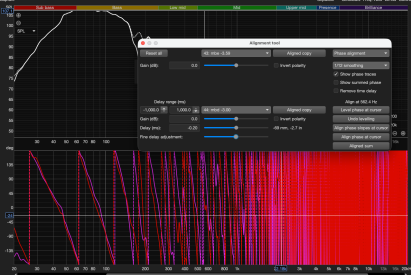
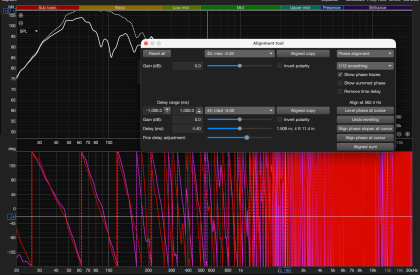
Since the beta 136 (I think), the phase graph in the alignment tool is not changing when altering the delay.
Thanks both, that's fixed in beta 141.The phase of the loudspeaker whose delay is adjusted either via Delay of Fine delay within the Alignment tool does not change on beta 140 when "Show phase traces" is selected
Running through a delay range on the alignment tool via the API is significantly slower than what it used to be, Nearly 3 minutes on a M4 Mac to cover 18ms at a rate of 0.03ms. Comparing against 135, it was usually done in about 5 seconds.
Attachments
Great work John!
Couple of quality of life requests for he RTA Stepped sine window.

Thank you.
Couple of quality of life requests for he RTA Stepped sine window.
- Can the Level setting have the same level picker as the usual generator and measurement window?
- Can the "capture distortion compensation data" button be a checkbox selection?
Thank you.
John Mulcahy
REW Author
Thread Starter
- Joined
- Apr 3, 2017
- Posts
- 9,635
It's a button rather than a checkbox as when it is selected it clears any current compensation, having it as a checkbox would be more likely to cause inadvertent compensation removal.Can the "capture distortion compensation data" button be a checkbox selection
John Mulcahy
REW Author
Thread Starter
- Joined
- Apr 3, 2017
- Posts
- 9,635
That's on my to-do list, but it takes up a lot of space and the dialog is already very tall.Can the Level setting have the same level picker as the usual generator and measurement window?
John Mulcahy
REW Author
Thread Starter
- Joined
- Apr 3, 2017
- Posts
- 9,635
Alignment of measurements with impulse responses takes longer with proper phase smoothing. You can either generate magnitude + phase copies of the measurements and align those, or use a variable step size so that you do not evaluate the alignment at so many points. Depending on your evaluation criteria a form of golden section search may be suitable, even if only to narrow the range after an initial coarse search.Running through a delay range on the alignment tool via the API is significantly slower than what it used to be, Nearly 3 minutes on a M4 Mac to cover 18ms at a rate of 0.03ms. Comparing against 135, it was usually done in about 5 seconds.
John Mulcahy
REW Author
Thread Starter
- Joined
- Apr 3, 2017
- Posts
- 9,635
No. The previous version just used magnitude and phase, but an IR is needed for proper phase smoothing. I've spent a few hours today optimising the code for the next build, so it's about twice as fast as it was, but how you use it may be a factor. The keyboard arrow keys are for very fine adjustments, they only change delay in 10 microsecond increments. Dragging the fine delay slider changes delay in 0.1 ms increments.John, is there any hope that later we'll get back to the same speed of the alignment tool as in the 135 version?
John Mulcahy
REW Author
Thread Starter
- Joined
- Apr 3, 2017
- Posts
- 9,635
I can't replicate that. Can you provide any further information and example measurements?For saved RTA measurements with "show distortion", the overlay popup on the SPL & phase chart is disappearing when I select different saved measurements. I change tabs and go back to SPL&phase and it will re-appear.
John, I’ve made an amusing observation: When I change the frequency or dB values in the tone generator clicking the up and down arrow keys, all the text and tabs within the generator window shift - quite smoothly and continuously. That surely wasn’t intended, was it? 
John Mulcahy
REW Author
Thread Starter
- Joined
- Apr 3, 2017
- Posts
- 9,635
I don't see that, which build are you running?When I change the frequency or dB values in the tone generator clicking the up and down arrow keys, all the text and tabs within the generator window shift
There have been a few layout oddities, perhaps because I migrated the build to Gradle and the tablelayout jar is coming from the Maven repository now. Maybe the supposedly identical jar is not as identical as it should be.
Sure. I'm using the Linux AMD64 build 141. Here's a short video of what I'm experiencing:I can't replicate that. Can you provide any further information and example measurements?
2026-11-09 08-45-34.mkv
 drive.google.com
Actually, nevermind, I realize I did not have "show distortion panel" checked. So the bug here is actually that the distortion panel is sometimes shown despite the selection in the control options.
John Mulcahy
REW Author
Thread Starter
- Joined
- Apr 3, 2017
- Posts
- 9,635
OK, I'll look at that. I did spot another issue though, the record of the DIM signal used in a measurement was being obfuscated, so those measurements are unlikely to open in versions other than the one which generated them. I have uploaded beta 144 to fix that going forwards.
Hi John,
In build 144, I've encountered an index out of bounds error trying to run multi-point input distortion compensation.
My test process:
REW V5.40 Beta 144 running Eclipse Adoptium JRE 17.0.17 64-bit on linux 7.2.9-1-manjaro Language en, country CA, keyboard CA, UTF-8 Screen 5120 x 1440 at 96 DPI Running in /home/reet/REW
Message:
java.lang.IndexOutOfBoundsException: Index 2 out of bounds for length 2
Stack Trace:
In build 144, I've encountered an index out of bounds error trying to run multi-point input distortion compensation.
My test process:
- Audio interface output to amplifier connected to 4 ohm resistive load
- Audio input is a voltage divider probe taken from the amplifier output.
- I ran RTA IMD vs frequency with the following settings:

- I set compensation order to 3, selecting "calculate compensation produced the error (mdat is attached):
REW V5.40 Beta 144 running Eclipse Adoptium JRE 17.0.17 64-bit on linux 7.2.9-1-manjaro Language en, country CA, keyboard CA, UTF-8 Screen 5120 x 1440 at 96 DPI Running in /home/reet/REW
Message:
java.lang.IndexOutOfBoundsException: Index 2 out of bounds for length 2
Stack Trace:
Index 2 out of bounds for length 2
java.base/jdk.internal.util.Preconditions.outOfBounds(Preconditions.java:64)
java.base/jdk.internal.util.Preconditions.outOfBoundsCheckIndex(Preconditions.java:70)
java.base/jdk.internal.util.Preconditions.checkIndex(Preconditions.java:266)
java.base/java.util.Objects.checkIndex(Objects.java:361)
java.base/java.util.ArrayList.get(ArrayList.java:427)
java.desktop/javax.swing.JTabbedPane.setEnabledAt(JTabbedPane.java:1552)
roomeqwizard.components.yB.A(y:1795)
roomeqwizard.dsp.D$1.process(y:934)
java.desktop/javax.swing.SwingWorker$3.run(SwingWorker.java:423)
java.desktop/sun.swing.AccumulativeRunnable.run(AccumulativeRunnable.java:112)
java.desktop/javax.swing.SwingWorker$DoSubmitAccumulativeRunnable.run(SwingWorker.java:848)
java.desktop/sun.swing.AccumulativeRunnable.run(AccumulativeRunnable.java:112)
java.desktop/javax.swing.SwingWorker$DoSubmitAccumulativeRunnable.actionPerformed(SwingWorker.java:858)
java.desktop/javax.swing.Timer.fireActionPerformed(Timer.java:311)
java.desktop/javax.swing.Timer$DoPostEvent.run(Timer.java:243)
java.desktop/java.awt.event.InvocationEvent.dispatch(InvocationEvent.java:318)
java.desktop/java.awt.EventQueue.dispatchEventImpl(EventQueue.java:773)
java.desktop/java.awt.EventQueue$4.run(EventQueue.java:720)
java.desktop/java.awt.EventQueue$4.run(EventQueue.java:714)
java.base/java.security.AccessController.doPrivileged(AccessController.java:399)
java.base/java.security.ProtectionDomain$JavaSecurityAccessImpl.doIntersectionPrivilege(ProtectionDomain.java:86)
java.desktop/java.awt.EventQueue.dispatchEvent(EventQueue.java:742)
java.desktop/java.awt.EventDispatchThread.pumpOneEventForFilters(EventDispatchThread.java:203)
java.desktop/java.awt.EventDispatchThread.pumpEventsForFilter(EventDispatchThread.java:124)
java.desktop/java.awt.EventDispatchThread.pumpEventsForHierarchy(EventDispatchThread.java:113)
java.desktop/java.awt.EventDispatchThread.pumpEvents(EventDispatchThread.java:109)
java.desktop/java.awt.EventDispatchThread.pumpEvents(EventDispatchThread.java:101)
java.desktop/java.awt.EventDispatchThread.run(EventDispatchThread.java:90)
java.base/jdk.internal.util.Preconditions.outOfBounds(Preconditions.java:64)
java.base/jdk.internal.util.Preconditions.outOfBoundsCheckIndex(Preconditions.java:70)
java.base/jdk.internal.util.Preconditions.checkIndex(Preconditions.java:266)
java.base/java.util.Objects.checkIndex(Objects.java:361)
java.base/java.util.ArrayList.get(ArrayList.java:427)
java.desktop/javax.swing.JTabbedPane.setEnabledAt(JTabbedPane.java:1552)
roomeqwizard.components.yB.A(y:1795)
roomeqwizard.dsp.D$1.process(y:934)
java.desktop/javax.swing.SwingWorker$3.run(SwingWorker.java:423)
java.desktop/sun.swing.AccumulativeRunnable.run(AccumulativeRunnable.java:112)
java.desktop/javax.swing.SwingWorker$DoSubmitAccumulativeRunnable.run(SwingWorker.java:848)
java.desktop/sun.swing.AccumulativeRunnable.run(AccumulativeRunnable.java:112)
java.desktop/javax.swing.SwingWorker$DoSubmitAccumulativeRunnable.actionPerformed(SwingWorker.java:858)
java.desktop/javax.swing.Timer.fireActionPerformed(Timer.java:311)
java.desktop/javax.swing.Timer$DoPostEvent.run(Timer.java:243)
java.desktop/java.awt.event.InvocationEvent.dispatch(InvocationEvent.java:318)
java.desktop/java.awt.EventQueue.dispatchEventImpl(EventQueue.java:773)
java.desktop/java.awt.EventQueue$4.run(EventQueue.java:720)
java.desktop/java.awt.EventQueue$4.run(EventQueue.java:714)
java.base/java.security.AccessController.doPrivileged(AccessController.java:399)
java.base/java.security.ProtectionDomain$JavaSecurityAccessImpl.doIntersectionPrivilege(ProtectionDomain.java:86)
java.desktop/java.awt.EventQueue.dispatchEvent(EventQueue.java:742)
java.desktop/java.awt.EventDispatchThread.pumpOneEventForFilters(EventDispatchThread.java:203)
java.desktop/java.awt.EventDispatchThread.pumpEventsForFilter(EventDispatchThread.java:124)
java.desktop/java.awt.EventDispatchThread.pumpEventsForHierarchy(EventDispatchThread.java:113)
java.desktop/java.awt.EventDispatchThread.pumpEvents(EventDispatchThread.java:109)
java.desktop/java.awt.EventDispatchThread.pumpEvents(EventDispatchThread.java:101)
java.desktop/java.awt.EventDispatchThread.run(EventDispatchThread.java:90)
Attachments
Last edited by a moderator:
John Mulcahy
REW Author
Thread Starter
- Joined
- Apr 3, 2017
- Posts
- 9,635
Thanks, that's fixed in beta 145. You don't need to repeat the measurement.In build 144, I've encountered an index out of bounds error trying to run multi-point input distortion compensation.
John Mulcahy
REW Author
Thread Starter
- Joined
- Apr 3, 2017
- Posts
- 9,635
I think there may be another issue when there's a 3rd order correction but no 2nd order, I'm looking at that now.Thanks, that's fixed in beta 145. You don't need to repeat the measurement.
John Mulcahy
REW Author
Thread Starter
- Joined
- Apr 3, 2017
- Posts
- 9,635
Fixed in beta 146.I think there may be another issue when there's a 3rd order correction but no 2nd order, I'm looking at that now.
LastButNotLeast
Member
- Joined
- Jun 5, 2017
- Posts
- 14
Can you add L+R to Sequential channels?
Thanks.
Michael
Thanks.
Michael
John Mulcahy
REW Author
Thread Starter
- Joined
- Apr 3, 2017
- Posts
- 9,635
It could be added, but only for Java drivers. I'm very reluctant to do that though because it would mess up the saved sequential channel options for users as they are saved by index and adding L+R would insert an extra index in the list.Can you add L+R to Sequential channels?




Popular tags
20th century fox
4k blu-ray
4k uhd
4k ultrahd
action
adventure
animated
animation
bass
blu-ray
calibration
comedy
comics
denon
dirac
dirac live
disney
dolby atmos
drama
fantasy
hdmi 2.1
home theater
horror
kaleidescape
klipsch
lionsgate
marantz
movies
onkyo
paramount
pioneer
rew
romance
sci-fi
scream factory
shout factory
sony
stormaudio
subwoofer
svs
terror
thriller
uhd
ultrahd
ultrahd 4k
universal
value electronics
warner
warner brothers
well go usa