Audiolense - jriver routing question

Audioholick

New Member
Thread Starter
Joined
Nov 8, 2025
Posts
22
More  
Preamp, Processor or Receiver
Pc, MOTU ultralite mk5
Main Amp
Nord acoustics hypex ncore
Front Speakers
acoustic elegance td10m Apollo Dayton AMT pro4
Subwoofers
stereo integrity 18” x4
Bass Shaker System
Earthquake Q10B
I have recently upgraded my audio interface to a MOTU ultralite mk5 from the previous AVB model to give me a few extra channels so I can take my minidsp 10x10 out the loop which was doing the x-over between tweeters and mids in the main speakers.
While I am waiting for some more TRS-XLR cables to arrive in the post I have set Audiolense up with just L&R and sub

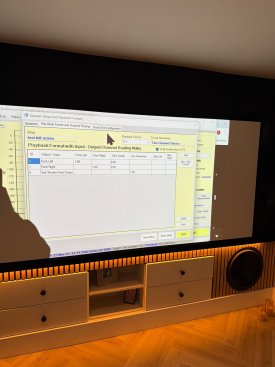
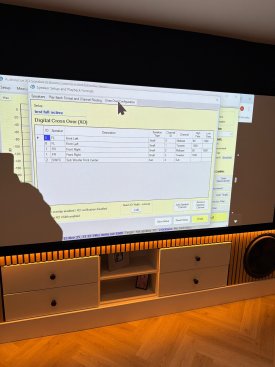
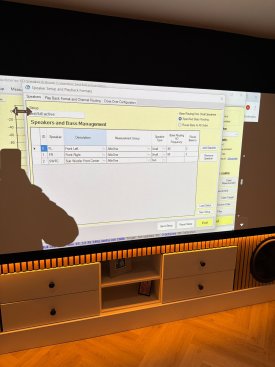
Attached are the pictures of the settings

It works perfectly for music and sounds incredible compared to how it did with the minidsp in the chain, however even though this arrangement is temporary until I hook the centre Chanel and rear speakers back up I’m finding that when I play a movie through Jriver, if I go on the MOTU cumix so I can see the output levels it looks as though the LFE Chanel is being output to Chanel 6, nothing is connected to that the sub is on 5, l&r speaker 1-4 so I have bass managed bass coming through the sub but not LFE.
Anyone know why??
Thank you
 

Attachments

  • image.jpg
    image.jpg
    477.7 KB · Views: 31
  • image.jpg
    image.jpg
    469.3 KB · Views: 34
  • image.jpg
    image.jpg
    501.9 KB · Views: 30
In fact looking at the analyzer on dsp studio in jriver it looks like a full range signal that seems to be at least 10db more than everything else
 
This might not be connected but try to cross the sub at 80 and 80.1hz. Sometimes this sets things right when offloading to the sub.
 
Thanks for the reply, do you mean change either the left or right speaker mid/sub to 80.1 and leave the other at 80?
 
That 10db gain you are seeing is baked into the LFE spec...

The LFE (Low Frequency Effects) channel in surround sound systems runs at a +10dB gain because this channel is mixed 10 dB lower during production to provide extra headroom for powerful bass effects. The +10dB boost is then applied by the playback system (like a home theater receiver or processor) to restore the LFE channel to its intended volume, matching the dynamic range of the other channels. This ensures a consistent and impactful bass experience without clipping, especially during loud explosions or other effects.

So, depending on the content being played (stereo, or multichannel with LFE) your going to see or not see that +10db difference... You may want to check the various modes your AVR supports...
 
Last edited:
Thank you for your reply, I understand about the LFE and the 10db gain, what I am asking is why there is what appears to be a full range signal on channel 6 that also happens to be around 10db hot maybe because no filters are applied to it? That shouldn’t be there, at first I assumed it was a spurious LFE Chanel but since looking at the analyser it’s full range almost as if it’s a sum of all the Chanel’s playing at once
 
Everything looks right with Audiolense, so you should look at settings in player and sound card.
 
In Al, how are channels mapped in measurement? Make sure that Jriver mixing is set to none (JRSS turned off). How do you have dsp output channel setting configured i.e. 5.1, source, etc...?
 
I have got my new xlr to trs cables soldered up tonight so set the full 5.1 with LCR 2 way active up from scratch, on measurement taking on speaker test it was all over the place, it had right tweeter an mid playing through the same Chanel to right mid for both and sub was sub and rear left. After an hour of headache I found the problem to be in the Cumix software for the motu ultra lite mk5, the Older model was easy to set up and had a table grid like input/output thing similar to audiolenses routing table, the cumix uses a mixing desk slider type arrangement and paired Chanel’s have a stereo button that turns out was pressed on some outputs.
Panic over it all works as it should now
 
Good thing you didn't blow a driver because of this. Seems like Motu decided to imitate the RME user (un)friendly interface :)
 
Luckily it was only sending wrong signals to woofers but also because of worries about blowing tweeters I have stuck some big Mundorf caps on the tweeters for protection, and I was only using the test speaker connection tone
 
Now it’s all working I’ve been playing about with XO widths and points, and target curves. I’m pretty happy with the curve but it’s dropping the level some 20db, which on jriver with 100% volume is quite loud but for movies and demoing big scenes it’s not even pushing the output on the ultra lite to ~80% and subs and amp are hardly breaking a sweat.

I have “pre eq” the sub to take down the 15db room mode at 35hz and it has helped. Do I need to do more pre eq shaping to avoid the big level drop? Any other tips?
Treble boost is disabled
Bass boost enabled and max 10db
Screenshot 2025-11-22 121722.png
 
Can you post a picture of your target before correction?
 
Something somewhere is driving all the corrections down. It could be the subwoofer in stand-alone mode.

Anyway, if you show the correction filters for all speakers (and nothing else) you will probably see something that is shooting high above the rest. And that's where you need to start.
 
Something somewhere is driving all the corrections down. It could be the subwoofer in stand-alone mode.

Anyway, if you show the correction filters for all speakers (and nothing else) you will probably see something that is shooting high above the rest. And that's where you need to start.
IMG_0209.jpeg
 
Could it be the tweeters overall level is too low compared to the midd/sub? I have 10db XLR attenuators on them currently
 
I have saved all the files to a folder on my one drive if it makes it easier for you to see details


Would be very greatfull if you could take a look
 
This was almost the opposite of what I asked for. Do this instead: Only keep the "correction filters" checked in the right check box area. Then select "all speakers". Then we should see which correction filter(s) is consuming excessive gain here.
Sorry. That makes sense, I will look when I get home from work. I bet it’s one of the rear Chanel’s needing bass boost
 
IMG_0257.jpeg

How come there is separate correction for sub and sub fl,fr,fc,bl,br seems to go much higher than the 100hz xover
 
It’s th LFE 250hz cut off, is there really any movie lfe content up there anyway?
 
Back
Top