






REW Beta Release REW API beta releases

Preferences help section says:

"Make sure that the input channel is the one connected to your SPL meter (or mic preamp output). If Use loopback as timing reference has been selected in the Analysis preferences the other channel will be used a reference to remove time delays within the computer and interface, this requires a loopback connection on the reference channel."

I can't see any "Use loopback as timing reference" option.
 
Hi, I'm testing the REW API. Cool idea! It looks like it should be possible to set the PEQ on a WiiM Ultra streamer automatically from REW measurements, for faster, "simpler" adjustments.

I am getting an error and this is just about error handling. If the measurement isn't selected in the GUI, REW throws an NPE (error dialog) during the import/EQ setup calls, and Match target then never reports completion. If you select it first, it's OK. Details below.


Environment: REW V5.40 Beta 135, Eclipse Adoptium JRE 17.0.20.1 64-bit, macOS 27.0.1, started with -api.

Steps to reproduce:
1. Start REW fresh with the API: open -a /Applications/REW/REW.app --args -api. No measurements are loaded, and GET /measurements/selected returns 0.
2. POST /application/blocking with body true.
3. POST /import/frequency-response-data with {"identifier":"npe-repro","isImpedance":false,"startFreq":20,"ppo":48,"magnitude":"<base64 BE float32[]>"}. This is a synthetic response from 20 Hz to 20 kHz. → Import … ID 1 completed
4. Don't select the measurement. GET /measurements/selected still returns 0.
5. POST /measurements/1/equaliser with {"manufacturer":"Generic","model":"Configurable PEQ"}. → Equaliser selected
6. PUT /measurements/1/target-settings with {"shape":"Full range"}. → Update processed
7. POST /measurements/1/eq/command with {"command":"Calculate target level"}. → Completed
8. POST /measurements/1/eq/command with {"command":"Match target"}.

Expected: Match target finishes and returns 200.

REW V5.40 Beta 135 running Eclipse Adoptium JRE 17.0.20.1 64-bit on OS X 27.0.1 Language en, country US, keyboard US, UTF-8 Screen 3840 x 1600 at 111 DPI Running in /Applications/REW


Message:
java.lang.NullPointerException: Cannot invoke "roomeqwizard.MeasData.getEqualiser()" because "this.K" is null
Stack Trace:
Cannot invoke "roomeqwizard.MeasData.getEqualiser()" because "this.K" is null
roomeqwizard.F.A.<init>(y:1047)
roomeqwizard.F.G.run(y:1349)
 
Hi @John Mulcahy can you please take a look at https://www.avsforum.com/posts/64633887/ thread and couple of posts after this thread where the MSO (Multi-Sub Optimizer) team has found how Biquad Coefficients need special adjustments for lower frequencies on miniDSP running the stock 96KHz firmware. Can these optimizations be added into REW EQ wizard when generating the miniDSP biquad file?

As you read posts, you can focus on post by the MSO developer i.e. andyc56 user and its posts so you can quickly filter out all the other conversations happening. You will likely need to read about 4-5 pages from this post to get everything the team found and did to come up with a solution. Thank you for taking a look and potentially doing further optimizing REQ EQ for miniDSP.
I've added coefficient optimisation on export for the next build. It was pretty straightforward, just needed to evaluate the effects of 1 lsb changes in the coefficients and pick the set with the best match to the nominal response. It is only done for centre frequencies below 50 Hz.
 
Builds updated today (beta 136) with these changes:
  • Added: Japanese translations for the user interface and the help, courtesy of Naoki Matsushita
  • Added: Full translations for the Simplified Chinese help files, courtesy of Jacky Shu
  • Added: There is a distortion compensation tool, see https://www.roomeqwizard.com/betahelp/help/html/distcomp.html
  • Added: The dual tone signal generator has an option to send its signals to separate outputs, f1 to one output and f2 to the other
  • Added: The dual tone signal generator has an option to lock its frequencies to FFT bins
  • Added: The signal generator has DIM30 and DIM100 dynamic intermodulation distortion signals
  • Added: The RTA measures dynamic intermodulation distortion
  • Added: There are stepped sine tests for IMD vs frequency and DFD vs frequency
  • Added: The signal generator shows a warning if the custom two-tone frequencies would cause collisions between the f2 sidebands and the harmonics of f1
  • Added: Coherent averaging can be used with dual tone signals (when using the option to lock the frequencies to FFT bins) and with multitone signals, provided the Rectangular window is being used with 0% overlap
  • Added: The measurement sweep can be adapted to better capture the decay in environments with long RT60 times at high frequencies
  • Added: miniDSP filter coefficients are optimised on export to allow for the effect of float truncation in the equaliser
  • Added: API MeasurementSummary object has a colour field
  • Added: API MeasurementSummary object has an onOverlay field indicating whether the measurement is selected for the All SPL and Overlay graphs
  • Added: API /application/graph-all-spl/selections endpoint that returns a map of MeasurementSummary objects for the current trace selections on the All SPL graph
  • Added: API TwoToneConfiguration object has a separateOutputs field
  • Added: API /audio/input-distortion-compensation-polynomial and /audio/output-distortion-compensation-polynomial endpoints to get and set the polynomials to use
  • Added: API GET at the /rta/distortion-compensation endpoint runs distortion compensation and returns correction polynomial coefficients
  • Added: API /measurements/{id}/graph-offset allows the graph display offset for a measurement to be read or set
  • Added: API stepped endpoint supports IMD vs frequency and DFD vs frequency tests
  • Added: API /eq/configurable-equaliser endpoint to get or set the default configurable equaliser settings
  • Added: A sweep.properties file was added
  • Changed: If the input and/or output device selections are default because a device was disconnected REW will automatically reselect it when it is reconnected
  • Changed: If the requested API port is not available up to 10 successive ports will be tried, if none are available a random available port will be assigned
  • Changed: The API import response for frequency response files, impulse response files, frequency response data and impulse response data includes the UUID of the new measurement
  • Changed: The V/V axis has a 120 dB upper limit
  • Changed: Traces are no longer zeroed outside their valid range for arithmetic operations
  • Changed: Modified measurements have a dot in the top right corner of their panel instead of using blue text for the name
  • Fixed: When the waterfall is in burst decay mode the info label did not show the slice periods figure
  • Fixed: The legend on graph captures could end up against the left side of the image
  • Fixed: Make excess phase copy with "Include cal file effects" selected did not properly allow for the measurement cal files
  • Fixed: Align SPL and Undo align SPL should ignore measurements that are not SPL data
  • Fixed: The test for available screen space did not allow for font differences
  • Fixed: PNG images did not use maximum file size compression
  • Fixed: When using the acoustic timing reference in an environment with high RT60 the later parts of the impulse response could have artefacts
  • Fixed: When using ASIO the current sample rate of the ASIO driver was not checked when starting up
  • Fixed: Noise plus non-harmonic distortion calculation is more accurate when noise is very low and harmonic distortion is high
  • Fixed: API-driven match to target used the current measurement selection in its optimisation pass instead of the targeted measurement
 
Last edited:
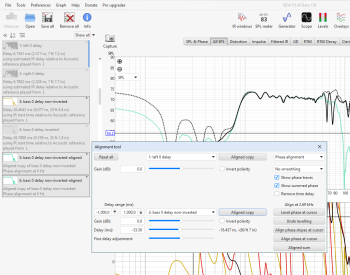
Release 136 is very slow for me. And it takes up a lot of memory. Each press of the keyboard arrow to move the slider in the Alignment tool adds as much memory allocation as was allocated when REW ran. 350 MB were allocated, after 6 clicks of the arrow it became 2000 MB.
 
On beta 137, I run into an error when trying to GET an impulse-response via API.
1793911441243.png

.mdat is here - raw.mdat
 
Version 137 works almost fine. But not like 135. I made a video with both versions in the alignment tool. In version 135, each press of the left arrow is processed, and holding the left arrow is quickly processed. All intermediate numbers are visible when pressed, the graphs move. In version 137, each press of the left arrow is also processed, but not so quickly (it’s not noticeable in the video). But when I held down the left arrow, the first short delay was at the 3.5 ms, then the next visible number was 15 ms, after that there was a long delay, the next visible number was 67 ms. There are no intermediate numbers visible between these three, and the graphs do not change.
 

Attachments

  • v.135.mp4
    5.8 MB
  • v.137.mp4
    2.4 MB
I have the same memory leak/performance behaviour if I use the up and down arrows to adjust the "SPL Offset (db):" field in a measurement. Essentially same as post 2088 above... using the up/down arrows repeatedly slows down each time, eventually consuming massive memory and hanging the app/Windows. I confirmed same issue with all 136-138.
 
In version 138, I shifted the original graph by 53.5 ms and made a copy. Then I moved on to overlays, an impulse, to see how it all turned out. The copy ended up in the same place as the original. There is no delay in the field where the delay is usually written.
 

Attachments

  • all SPL.PNG
    all SPL.PNG
    142.8 KB · Views: 10
In version 138, I shifted the original graph by 53.5 ms and made a copy. Then I moved on to overlays, an impulse, to see how it all turned out. The copy ended up in the same place as the original. There is no delay in the field where the delay is usually written.
Thanks, fixed in 139 along with the arrow key behaviour when held.
 
Running beta 139 and had a question. On prior versions, I could multiply a magnitude only response with an impulse response, and it would simply inherit the phase/impulse, while the SPL response goes through the A * B arithmetic. Now if I try it, I run into the following error -
REW V5.40 Beta 139 running Eclipse Adoptium JRE 17.0.17 64-bit on Windows 11 Language en, country US, keyboard US, windows-1252 Screen 1463 x 823 at 168 DPI Running in C:\Program Files\REW


Message:
java.util.concurrent.ExecutionException: java.lang.NullPointerException
Stack Trace:
java.lang.NullPointerException
java.base/java.util.concurrent.FutureTask.report(FutureTask.java:122)
java.base/java.util.concurrent.FutureTask.get(FutureTask.java:191)
java.desktop/javax.swing.SwingWorker.get(SwingWorker.java:613)
roomeqwizard.J.S.done(y:3018)
java.desktop/javax.swing.SwingWorker$5.run(SwingWorker.java:750)
java.desktop/javax.swing.SwingWorker$DoSubmitAccumulativeRunnable.run(SwingWorker.java:848)
java.desktop/sun.swing.AccumulativeRunnable.run(AccumulativeRunnable.java:112)
java.desktop/javax.swing.SwingWorker$DoSubmitAccumulativeRunnable.actionPerformed(SwingWorker.java:858)
java.desktop/javax.swing.Timer.fireActionPerformed(Timer.java:311)
java.desktop/javax.swing.Timer$DoPostEvent.run(Timer.java:243)
java.desktop/java.awt.event.InvocationEvent.dispatch(InvocationEvent.java:318)
java.desktop/java.awt.EventQueue.dispatchEventImpl(EventQueue.java:773)
java.desktop/java.awt.EventQueue$4.run(EventQueue.java:720)
java.desktop/java.awt.EventQueue$4.run(EventQueue.java:714)
java.base/java.security.AccessController.doPrivileged(AccessController.java:399)
java.base/java.security.ProtectionDomain$JavaSecurityAccessImpl.doIntersectionPrivilege(ProtectionDomain.java:86)
java.desktop/java.awt.EventQueue.dispatchEvent(EventQueue.java:742)
java.desktop/java.awt.EventDispatchThread.pumpOneEventForFilters(EventDispatchThread.java:203)
java.desktop/java.awt.EventDispatchThread.pumpEventsForFilter(EventDispatchThread.java:124)
java.desktop/java.awt.EventDispatchThread.pumpEventsForHierarchy(EventDispatchThread.java:113)
java.desktop/java.awt.EventDispatchThread.pumpEvents(EventDispatchThread.java:109)
java.desktop/java.awt.EventDispatchThread.pumpEvents(EventDispatchThread.java:101)
java.desktop/java.awt.EventDispatchThread.run(EventDispatchThread.java:90)
Caused by:
java.lang.NullPointerException
Is this the expected behavior?
 
Hello used the last beta Versions 5.4 135 and 139 now.

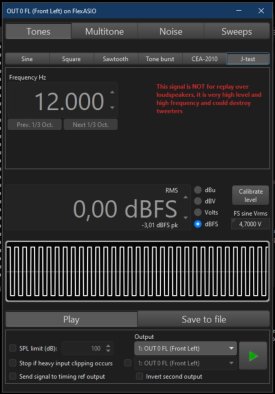
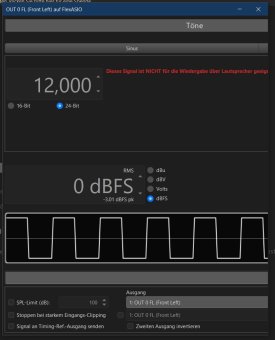
There is an Problem with J-Test on Generator Tab.

If you use the J-Test tab the windows is endless runing away in his Frame.

5.31 Version ok:
REW J-test.jpg

5.4 135 139 not ok:
REW J-Test Error.jpg

Windows 10 and AMD Hardware used, Ryzen 9950X, and 9070XT GPU, 32GB Ram
Board MAG X870E TOMAHAWK MAX WIFI

Latest Java update done no change.
 
Last edited:
Back
Top