Where is the bass going?

robbnj

Member
Thread Starter
Joined
Oct 24, 2022
Posts
72
More  
Preamp, Processor or Receiver
Denon
Main Amp
B&O icePower
DAC
Denon
Computer Audio
JRiver
Hi all.

Doing some fiddling with my main speakers today. and wanted to get a set of sweeps to save and tinker with.
I did a measurement of each main speaker independently, then a measurement of them both playing. I noticed that the bas dropped off quite a bit when I measured both at the same time.

I thought "could I possibly have had a woofer out of phase for who knows how long?!", so I disabled the mids/tweets (just to have a clean test) and tested the bass modules alone (the speakers consist of a fully independent bass module, and mid/tweet module, and can be bi-amped).
First left, then right, then together.
Then, I reversed the wiring polarity on just the right speaker, and tested them both together again.

You can see in the first pic how having both speakers playing at the same time kills the bass.
Same thing in the second pic, yet the responses are similar in or out of phase, even though you can see the phase "shift" when looking at peaks and troughs between the two L+R tests..

There is no EQ or any type of processing enabled for these tests, and it happens across multiple mic positions.
The speakers are 24" from back wall, 36" from side wall, 96" apart.

I'd throw a guess that something is happening in REW when I use L+R versus just L or just R, but I cannot even fathom a guess as to how I am losing bass by having two woofers playing, regardless of whether they are in phase or out of phase with each other.

Any ideas?

The loss of bass is pretty extreme when testing both speakers at once:
CARVER 1.jpg


The loss of bass is the same even when the wiring on one bass module is reversed and both are tested together.
CARVER 2.jpg


EDIT TO ADD:

When I do a vector average with REW of the separate sweeps (#19 in gold), it shows the bass loss.
If I use the "invert" function and do another average (red), the bass loss is fixed. BUT, this does not work when I electrically invert the signal by switching the wiring.
Color me even more confused.

CARVER VECTOR.jpg
 
Last edited:
1. I don't know what "P2" and "P3" are, so I ignored them.

2. None of your measurements have a timing reference.

3. If you want to see what happens when L and R are playing together, use "Vector Sum" not "Vector Average".

1777590670304.png


This is a comparison of your actual measurement (blue) vs. the vector sum of your full range speakers (purple). For your reference, I selected Curves 1 and 2 in your MDAT, and then vector summed them and compared them to Curve 3. The two should be exactly the same. As you can see, they are not.

1777591110913.png


I see that you disconnected the bass units to measure them independently. Here are the measurements of your L and R bass units together with the measurement of both speakers together. Notice how the bass VERY COINCIDENTALLY seems to roll off as if the L/R bass units have been removed? Very suspicious, isn't it?

1777591180785.png


If we vector sum all 3 measurements (Curves 3, 4, and 5 in your MDAT) and compare it to the vector sum of your L/R main speakers, we see that the response is the same.

Conclusion: you forgot to reconnect your bass units when you took the measurement of your L/R main speakers together.
 
I hope you don't mind if I ask, what specific speaker make and model are you testing? I see a label "Carver" are these Open Baffle Electrostatic by any chance? And if you don't mind, are you powering these with a B&O icePower amp that puts out how many Watts per channel... It would be fun to know what the impedance curve of those speakers are and how that B&O amp responds to them...
 
1. I don't know what "P2" and "P3" are, so I ignored them.

2. None of your measurements have a timing reference.

3. If you want to see what happens when L and R are playing together, use "Vector Sum" not "Vector Average".

View attachment 92081

This is a comparison of your actual measurement (blue) vs. the vector sum of your full range speakers (purple). For your reference, I selected Curves 1 and 2 in your MDAT, and then vector summed them and compared them to Curve 3. The two should be exactly the same. As you can see, they are not.

View attachment 92082

I see that you disconnected the bass units to measure them independently. Here are the measurements of your L and R bass units together with the measurement of both speakers together. Notice how the bass VERY COINCIDENTALLY seems to roll off as if the L/R bass units have been removed? Very suspicious, isn't it?

View attachment 92083

If we vector sum all 3 measurements (Curves 3, 4, and 5 in your MDAT) and compare it to the vector sum of your L/R main speakers, we see that the response is the same.

Conclusion: you forgot to reconnect your bass units when you took the measurement of your L/R main speakers together.
I labeled them P1 through P3 to represent the differing locations of the mic around the MLP. I was wanting to make sure I wasn't just catching some freaky room mode at the MLP that was crushing the bass.

I see where you are going with your conclusion, but the speakers were each measured as a single "unit" and then as a pair at 5 different listening positions BEFORE I noticed the bass drop.That bass drop is represented by the actual L+R measurement (not a mathematical sum from REW) versus either speaker alone. The sweeps named "bass module only" could not be the mid/tweet sections. There is no physical way they could punch out 85-90dB at 40Hz (REW calibrated to a pro-calibrated SPL meter), as they are 48" ribbons that are crossed over at about 150Hz.

It was only after I spotted the anomaly that I pulled the biamp jumpers and measured the bass modules fully independently, then together, to show the loss when they are combined. It also shows that the loss is the same whether they are in or out of phase with each other.

And it's not only measured. If I run pink noise through either channel, I can HEAR that the bass is louder with either channel alone, versus both playing together, no matter which way the subs are wired relative to each other.

Each gold line is a bass module playing by itself. The green line is both modules playing at the same time. The purple line is both modules playing at the same time, but the wiring has been reversed on one of them.

No other changes were made across the four sweeps. This is purely an acoustic capture. No vector sums, averages, alignments, or anything.

1777597111215.png
 
I hope you don't mind if I ask, what specific speaker make and model are you testing? I see a label "Carver" are these Open Baffle Electrostatic by any chance? And if you don't mind, are you powering these with a B&O icePower amp that puts out how many Watts per channel... It would be fun to know what the impedance curve of those speakers are and how that B&O amp responds to them...
No, these are the ALSIII with the 48" ribbon driver for the top end.
The ICEPower modules are the 250W units. Each one has its own power supply, and they are rated 250W @ 8ohms, 500W at 4ohms. The Carvers are rated at 4Ohms, but I heard they can dip a fair bit lower.

The amps dive them louder than I ever need to, but I've never heard them strain even when driving the speakers at uncomfortable levels.
 
It is very difficult to have faith in your measurements.

1777606436831.png


Here are two measurements labelled "L Carver Bass Module Only P2". You would expect them to be exactly the same. As you can see, they are not.

1777606488327.png


In fact, if you examine the step response of both measurements, you can clearly see that the measurements were taken from different positions, even though they were both labelled "P2".

1777606700570.png


Here is another example, three measurements with the SAME LABEL. When we see the same label, we think "same microphone position, nothing touched between measurements". Yet two of the measurements have a falling bass response and the third is what you would expect. The most likely explanation is that you simply mislabelled them or that you were confused when selecting parameters for measurement.

1777607608176.png


And talking about "selecting parameters" ... what is this? Are you measuring through your laptop microphone?

This set of measurements that you posted can not be interpreted, it is full of mistakes. If the labels are wrong, it is extremely misleading.

Please take a new set of measurements. This time, ONLY FROM ONE POSITION so that we don't have to look at 24 curves. If it's a full range speaker, make sure the jumpers connecting bass to mid/tweet are in place, then sweep the whole speaker together: left, right, and both, with the same timing reference (I suggest using the left speaker).
 
No, these are the ALSIII with the 48" ribbon driver for the top end.
The ICEPower modules are the 250W units. Each one has its own power supply, and they are rated 250W @ 8ohms, 500W at 4ohms. The Carvers are rated at 4Ohms, but I heard they can dip a fair bit lower.

The amps dive them louder than I ever need to, but I've never heard them strain even when driving the speakers at uncomfortable levels.
OK... So, still Dipol and Ribbon not E-stat and still emphasizing speaker placement... 30+ years old and needs 300+ Watts per channel to "really sing"... Bob Carver, has suggested 500–1000WPC to prevent clipping and drive the 48-inch ribbon drivers to their full potential without distortion... Unknown what the bass drivers need...

Some food for thought...
Voltage vs. Power: The Power Paradigm emphasizes consistent power output, whereas the doubling paradigm emphasizes maintaining constant voltage to drive lower impedances...

Design: Power paradigm amps often use tubes with transformers, while doubling amps are typically solid-state with high current capacity...

Goal: The Power Paradigm aims for consistent output voltage-to-impedance ratio, while the doubling approach aims to provide necessary current for low-impedance, power-hungry speakers....
 
Last edited:
It is very difficult to have faith in your measurements.

View attachment 92086

Here are two measurements labelled "L Carver Bass Module Only P2". You would expect them to be exactly the same. As you can see, they are not.

View attachment 92087

In fact, if you examine the step response of both measurements, you can clearly see that the measurements were taken from different positions, even though they were both labelled "P2".

View attachment 92088

Here is another example, three measurements with the SAME LABEL. When we see the same label, we think "same microphone position, nothing touched between measurements". Yet two of the measurements have a falling bass response and the third is what you would expect. The most likely explanation is that you simply mislabelled them or that you were confused when selecting parameters for measurement.

View attachment 92089

And talking about "selecting parameters" ... what is this? Are you measuring through your laptop microphone?

This set of measurements that you posted can not be interpreted, it is full of mistakes. If the labels are wrong, it is extremely misleading.

Please take a new set of measurements. This time, ONLY FROM ONE POSITION so that we don't have to look at 24 curves. If it's a full range speaker, make sure the jumpers connecting bass to mid/tweet are in place, then sweep the whole speaker together: left, right, and both, with the same timing reference (I suggest using the left speaker).
I suppose I could take video of me taking the individual measurements, the combined measurements, switching the cable on the one woofer module, then measuring again, just so you are confident that I am doing it right. I just finished doing a 3 sub setup from gain matching, cross correlation, phase alignment, EQ, MINIDSP setup, etc, so I thought I knew what I was doing. But maybe not.


Why the Meas. Info says I have no output and no input, yet REW managed to create varying curves based on which speaker and mic position I am doing, is beyond me.

You specifically asked for the mdat file above and beyond the images specific to the issue itself, which I provided.
Should I wipe out all the measurements except just the bass modules L, R, then L+R, re-save, then post it here?

I'll do a quick set of tests again this afternoon to show my process.
 
OK... So, still Dipol and Ribbon not E-stat and still emphasizing speaker placement... 30+ years old and needs 300+ Watts per channel to "really sing"... Bob Carver, has suggested 500–1000WPC to prevent clipping and drive the 48-inch ribbon drivers to their full potential without distortion... Unknown what the bass drivers need...

Some food for thought...
Voltage vs. Power: The Power Paradigm emphasizes consistent power output, whereas the doubling paradigm emphasizes maintaining constant voltage to drive lower impedances...

Design: Power paradigm amps often use tubes with transformers, while doubling amps are typically solid-state with high current capacity...

Goal: The Power Paradigm aims for consistent output voltage-to-impedance ratio, while the doubling approach aims to provide necessary current for low-impedance, power-hungry speakers....
I'm not really sure what this all means in reference to this weird issue of disappearing bass, but each amp will do 500W at 4 ohms (the nominal impedance of the Carvers), and more as the impedance drops.

I'm running a mono amp for each channel, and they are putting out the same power each, whether I send a signal to either, or both together.
There should be no power loss or change when playing L+R versus just L or just R.
 
Each gold line is a bass module playing by itself. The green line is both modules playing at the same time. The purple line is both modules playing at the same time, but the wiring has been reversed on one of them.

No other changes were made across the four sweeps. This is purely an acoustic capture. No vector sums, averages, alignments, or anything.
FWIW, being curious and mathematically challenged I fed the chart to an ai along with the explanation of the top 2 / lower 2 measurements and the condition that neither of the two acoustic sources nor the mic changed location for any of the 4 measurements. The answer was the reported combination of measurements are not physically possible. The obvious conclusion then being something amiss with the measurements or their labeling.
 
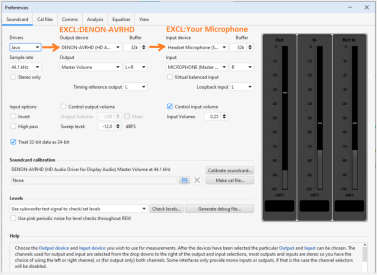
Select the inputs and outputs on REW's soundcard preferences. REW puts out the same signal no matter what output or output combination is selected. The usual causes of low end roll-off are processing (e.g. a processor redirecting the signal to a centre channel), acoustic cancellations as you have been investigating, or noise cancellation in mic processing for stereo mics (though that would affect all measurements). Computer effects such as noise cancellation can be avoided by choosing the WASAPI Exclusive device entries in REW, names that start with EXCL.
 
I suppose I could take video of me taking the individual measurements, the combined measurements, switching the cable on the one woofer module, then measuring again, just so you are confident that I am doing it right.
To figure out how the subs interact with each other and the subs with the main speakers, you must take measurements of each participant in the sound creation separately and synchronize them in time with a loopback, or acoustic reference source. The second option is simpler. Because this reference source could be the tweeter of one of the main speakers. To do this, you need to indicate to REW that the output of the right (for example) channel is the reference one. The left channel output will be the main one. All speakers to be measured must be connected in turn to the left channel. When the turn reaches the right channel, you need to indicate to REW that the output of the right channel will be both the reference and the main one. These settings are made on the sound card tab. Keith_W wrote to you about this. All measurements without this will not provide useful information for your question. Also do what John Mulcahy wrote. You can read about time synchronization on the help page.
 
I'm not really sure what this all means in reference to this weird issue of disappearing bass, but each amp will do 500W at 4 ohms (the nominal impedance of the Carvers), and more as the impedance drops.

I'm running a mono amp for each channel, and they are putting out the same power each, whether I send a signal to either, or both together.
There should be no power loss or change when playing L+R versus just L or just R.
Basically, When the amplifier sends a signal to your Carver AL-III's 10-inch woofer, the cone moves. Because a speaker is a motor (voice coil in a magnetic field), this movement induces a voltage that flows back into the amplifier. Damping Factor: The ratio of speaker impedance to the amplifier’s internal output impedance. An amplifier with a high damping factor (low output impedance) acts as a "short circuit" for this back EMF. This "brakes" the cone’s motion, preventing it from ringing or producing "muddy" bass. Negative Feedback Loops: Most solid-state amplifiers use negative feedback circuits that sample the signal at the output terminals and compare it to the input. If the speaker’s back EMF or shifting impedance distorts that output signal, the feedback loop tries to correct it in real-time by applying an "error signal" in reverse polarity. Frequency Dependence: Because the AL-III's impedance changes drastically with frequency, the "feedback" the amp receives also changes. In the Bass: Large cone excursions create significant back EMF that requires high damping. In the Treble: Complex impedance dips in the ribbons can stress the feedback loop’s stability, sometimes leading to harshness or "ringing" if the amp isn't high-current...

And, The Carver AL-III ribbons are notoriously difficult because their low impedance (sometimes dipping to 2-3 ohms) requires the amplifier to be a perfect "current source" aka Power Paradigm. If the amp cannot "absorb" the feedback from the speakers effectively. Voltage Sag: The output voltage can "sag," changing the intended musical signal. Coloration: With tube amps (which typically have higher output impedance), the voltage delivered to the speaker actually changes in proportion to the AL-III's impedance curve, effectively boosting or cutting certain frequencies and "coloring" the sound.This is why Bob Carver eventually designed "load-invariant" amplifiers like the Sunfire series—they were specifically engineered to stay stable regardless of how much back EMF or impedance "feedback" the speaker sent back to the amp...

Is this the issue you are chasing? I don't know... However, I do know from my own experience with electrostatic, horns and ribbon hybrid type speakers the type of amplifier does make a significant difference in speaker behavior and hence sound...
 
Last edited:
OK, so I redid the tests, and took video of the process.
As you'll see in the video, I do left main, right main, then the mains together. "NO SUBS" in the sweep name means this is the main speakers only; my powered subs are physically disconnected from the system.
I then run and swap the wires of the right speaker only, then test left, right, and left/right together.
Each time I test left and right together, the bass drops out regardless of the wiring, though you can see that the L+R tests are different from each other after I reverse the wiring in just one speaker.

the video:


1777691104695.png

1777691596726.png

Screen grab to show the literal big picture of my test screen.
#3 and #6 are both mains playing together. The gold is with them wired in proper phase; the purple is with them wired out of phase (at least as far as the external wiring indicates).

Weird, huh?

Yes, I spotted the level mismatch between speakers. Going to fix that.

Oh, and the setup is a Denon AVRX-4000, being fed via HDMI from my HP laptop with all Windows audio enhancements disabled. It feeds two B&O IcePower 250ASP full-monoblock amps. All DSP in the Denon was disabled for the tests. Mains set to large.
The mic is a Dayton IMM6 with calibration file enabled, connected via USB mini soundcard. I have tested several of these types of USB input devices, and they all measure similarly flat when measured by loop-through, and give virtually identical results when doing live testing.
I also tested a UMIK alongside the Dayton, and they were virtually identical in their pickup, so I stayed with the cheaper option that i already owned.
 
Last edited:

To figure out how the subs interact with each other and the subs with the main speakers, you must take measurements of each participant in the sound creation separately and synchronize them in time with a loopback, or acoustic reference source. The second option is simpler. Because this reference source could be the tweeter of one of the main speakers. To do this, you need to indicate to REW that the output of the right (for example) channel is the reference one. The left channel output will be the main one. All speakers to be measured must be connected in turn to the left channel. When the turn reaches the right channel, you need to indicate to REW that the output of the right channel will be both the reference and the main one. These settings are made on the sound card tab. Keith_W wrote to you about this. All measurements without this will not provide useful information for your question. Also do what John Mulcahy wrote. You can read about time synchronization on the help page.
Are you saying that to test each speaker, I have to go to the soundcard page and select it there, not just by selecting it at the measurement window, like I do in my video?
I will have to give that a try. I thought that just selecting a channel on the measurement page sent a signal to that channel (or set, in the case of the mains).
And, I read your response after I had already done the video with my new tests. Felt wasteful not to share it.

The original and tonight's tests were done with the powered subs physically disconnected for the system. My "bass module" reference was that these speakers have a separate bass cabinet with a 10" woofer, and then a 48" ribbon driver bolted on top. They can be electrically disconnected from each other by removing jumper plates between the wire terminals on the back.
I disconnected the bass modules and tested them separately once I saw the anomaly, in order to isolate the possible cause (thinking that one of the woofers may have been wired wrong internally all these years).
 
OK, so I redid the tests,

What type of mic are you using for these measurements?

headsetmic.png


Your settings indicate a 'headset microphone'. What is this? Do you have a calibration file for this mic? If this is some sort of gaming headset mic then it is completely unsuitable for measurement purposes and you need to obtain a mic specifically made for measurements such as a UMIK-1 or similar.
 
I don't think this is an acoustic issue. With your previous measurements, I have already checked if poor microphone centring was the culprit. It was not. I also tried inverting the phase and summing. This was not the culprit either.

After viewing your video, I suspect this is due to some kind of processing in your AVR when it receives multichannel input.

To confirm that this is not an acoustic issue, try this:

1. Place your microphone directly in front of the woofer, about 1 foot away. Let's say left speaker.
2. Disconnect the right speaker by removing the speaker cables.
3. Sweep the left speaker with "L" alone.
4. Sweep the left speaker with "L+R".

Also, please confirm if you are using WASAPI Exclusive given that you are using REW in Java mode. As John says, the output should be labelled EXCL.

As already mentioned, a headset microphone is not suitable for taking audio measurements. Still, using an inappropriate microphone does not explain what is going on here.
 
What type of mic are you using for these measurements?

View attachment 92098

Your settings indicate a 'headset microphone'. What is this? Do you have a calibration file for this mic? If this is some sort of gaming headset mic then it is completely unsuitable for measurement purposes and you need to obtain a mic specifically made for measurements such as a UMIK-1 or similar.

The mic is a Dayton IMM6 with calibration file enabled, connected via USB mini soundcard. I have tested several of these types of USB input devices, and they all measure similarly flat when measured by loop-through, and give virtually identical results when doing live testing.
I also tested a UMIK alongside the Dayton, and they were virtually identical in their pickup, so I stayed with the cheaper option that i already owned.
 
I don't think this is an acoustic issue. With your previous measurements, I have already checked if poor microphone centring was the culprit. It was not. I also tried inverting the phase and summing. This was not the culprit either.

After viewing your video, I suspect this is due to some kind of processing in your AVR when it receives multichannel input.

To confirm that this is not an acoustic issue, try this:

1. Place your microphone directly in front of the woofer, about 1 foot away. Let's say left speaker.
2. Disconnect the right speaker by removing the speaker cables.
3. Sweep the left speaker with "L" alone.
4. Sweep the left speaker with "L+R".

Also, please confirm if you are using WASAPI Exclusive given that you are using REW in Java mode. As John says, the output should be labelled EXCL.

As already mentioned, a headset microphone is not suitable for taking audio measurements. Still, using an inappropriate microphone does not explain what is going on here.
I forgot to include a screenshot, but the input and output are listed as EXCL, and are actually the only devices visible in the list.
The microphone is a calibrated IMM6 from Dayton, going through a USB mini "soundcard". I have compared the USB unit with others, including a nice Behringer unit, and there is not enough difference to matter.
I have also compared it with a UMIK and they are virtually identical in my system (I have a thread elsewhere, showing the comparison of multiple mic setups).

If you listen to the YT video with headphones, you may even be able to hear the bass drop off when testing L+R.
Going to try your close-mic suggestion tomorrow night, when I can test again!

1777703762020.png

(the "PC mic" was actually a mic element I bought years ago from DigiKey, and mounted in an old PC mic housing)
 
I suspect that some setting in the receiver or sound card or windows is cutting off the low frequencies if the right channel and left channel are running together. On the Soundcard page, the output and input devices should look like this.

Another reason is poor contact in the microphone-sound card-usb of the computer.
 

Attachments

  • excl.PNG
    excl.PNG
    287.9 KB · Views: 7
Last edited:
This is what I get when I test the left speaker alone, then the L+R, but with the right disconnected, then the disconnected right.
So I guess we've ruled out acoustic cancellation by the room, by the other speaker, or by a bad mic connection.

That leaves me with computer, or AVR.
I'm going to make up some test sweeps on a CD and on the PC and see how they sound when played back, compared to the REW sweeps (which not only measure weaker, but SOUND decidedly weaker when played as L+R).

1777768536672.png


1777768579690.png


1777769896277.png
 
Congratulations, you are getting closer to diagnosing the problem. We have now confirmed that the reason for the missing bass is due to some kind of processing upstream from the amplifiers, and it is logical to suspect either the computer or the AVR.

I think we can easily rule out the computer, unless you have some kind of DSP in the signal chain that you forgot about. Since it is so easily audible, you don't even need to take REW measurements. Use REW's generator and create pink noise .WAV files for L, R, and L+R. Play it back on your favourite player software and see if it sounds different. I see you are already planning to do that.

I would place the blame on your AVR. There is going to be a setting in there that cuts bass when stereo signal is detected. Unfortunately this is where I have to bow out, I don't know AVR's so I can't tell you where to look. Time to RTFM I guess!
 
Back
Top