

Separate/different simultaneous output signals for L and R.

jan.didden

New Member
Thread Starter
Joined
May 14, 2020
Posts
21
Hi, I want to output two different signals, one from the L channel and the other from the R channel.
I tried the two-tone generator setup but both tones are output to both :L and R. I need one tone to be output from L and the other tone from R, at the same time.
Is that possible with REW and how would I go about setting that up?

Jan Didden
 
No, REW can't be configured to do that. Easiest might be to save each tone to a mono WAV file and use an external utility to merge them into a stereo file and play that with your player of choice.
 
Thanks for the quick reply John!
I am attempting to measure microphone distortion
One known method is having the L and R speaker generate a different tone.
Those tones will not IM in the air but the mike recieving them will IM, so any IM you see in the received spectrum can only be from the mike.
If I generate the two signals from a dual signal generator separate from REW, will there be a sync problem in measuring the result with the RTA?

thanks,

Jan Didden
 
Shouldn't be, but you'll need to set up the same dual tone signal in the REW generator so REW knows what to analyse if you want REW to do the calculations.
 
PS: Someone came up with the idea to spawn two instances of REW, and each send a signal out to a different channel.
Then use either instance for the analysis.
I can try that but won't the two instances fight over access to the soundcard?

Edit: or use two soundcards.

Jan
 
I can try that but won't the two instances fight over access to the soundcard?

It wouldn't if you use WASAPI Shared. But I don't recommend it, WASAPI Shared sends everything through the Windows mixer. If all you are after is a test tone, it should be OK. But the Windows mixer does all sorts of horrible things to the signal - it's not bit perfect, it might resample the audio, the latency is all over the place (so completely unusable for timing measurements), and it might mix in other sounds, e.g. system notification beeps.

If you want WASAPI Exclusive or ASIO, your best bet is to use something like VB Audio Matrix. Set up two virtual inputs, and configure the Matrix to send both inputs to separate output channels on the sound card.
 
I set up two external different frequency sources for each speaker. I set up the same sources in the REW generator but they go nowhere.
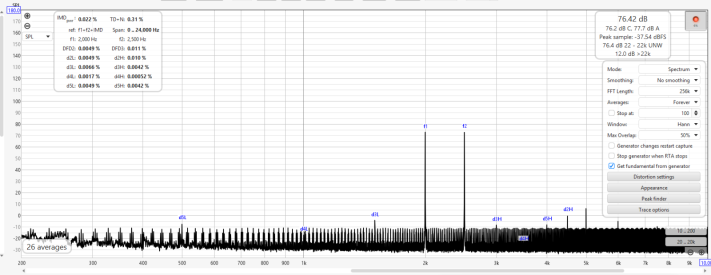
Then do an RTA with REW. I got about what I expected, the mike IMD is at 500Hz (difference) and 4.5kHz (sum).
Next I need to figure out how to save and recal sigbnals in REW, and how to load them in the waveform math processor.

Jan
 

Attachments

  • rew im test1.png
    rew im test1.png
    225.5 KB · Views: 3
@jan.didden I don't have much experience with what you are doing, but I am curious about the appearance of your noise floor. It does not look like random noise to me, it looks like a clear pattern of tones about 20Hz apart that have that appearance of crowding together at higher frequencies due to the logarithmic scale. Count them - there are 5 spikes between 200-300Hz, and there are also 5 spikes between 700-800Hz.

Did you use WASAPI Shared? I would be suspicious that some kind of artefact has crept into your measurement?

Out of curiosity, how do you subtract the room noise floor from your measurement?

Your thread inspired me to do a bit of Googling. I found this nice article about microphone noise, and this article about microphone distortion. Now I am curious about testing the 3 microphones that I own!

Once again - I don't know the answer, I have no experience. If this appearance is what you expect, let me know.
 
@Keith_W, I have that paper as well. There doesn't seem to be any real data in it.
Microphone distortion numers are rare as hen's teeth - the best you can hope for is like "<2% at 160dB" or similar.
(My end goal is to measure the distortion of my electrostatic speakers down to -100dB).
I believe (not sure) that the regular noise pattern is caused by the fact that the sound sources being used are not at all synchronised with REW and/or the soundcard used (4i4).
Due to a limitation in REW I am using a separate hardware dual signal generator for the 2kHz and 2.5kHz sources feeding the speakers.
To tell REW what signals to expect, I set the REW generator also to 2kHz & 2.5kHz, but there's not any syncronisation between the REW generator and the external dual signal source.

The two speakers send out a single tone each, and they do not intermodulate in the air. However, the mike does, so by looking at the IM products I have a view of the mike (IM) distortion, without the speaker distortion interfering.

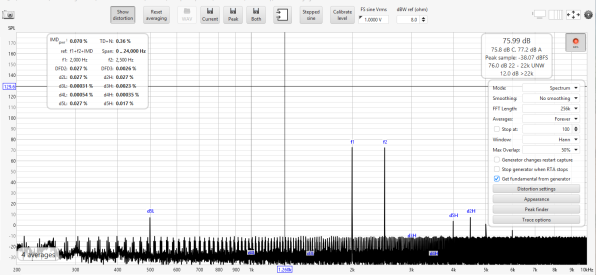
I measured a mems mike just now, and the IMD products (500Hz and 4.5kHz, D5L and D2H) are higher than in the previous measurement. As expected - the EMX7150 is more linear than the mems.

Jan
 

Attachments

  • rew im test1 BWmems.png
    rew im test1 BWmems.png
    140.3 KB · Views: 2
Last edited:
@jan.didden would you be able to share the method you are using to measure mic distortion?

After thinking about it, perhaps John's suggestion of merging two separate mono files into stereo might be the best solution. I have the ability to do this. If you tell me the parameters of your test tone, I can create a test signal and send you a link to download it. Screenshots of your Generator would be sufficient.

I am very interested in your experiment and I would like to do what I can to help :)
 
Well, normally you would take a clean source, measure that sound with a mic and see what distortion that mic adds..
The problem is that 'a clean source' has more distortion than the mic you want to measure so that's a dead end.
The method I use (which has been used, on and off, for decades) is to use two sources that are not particularly clean.
These two tone arrive at the mic without IMD because they do not intermodulate in the air (unless you go to 200dB SPL, air is nonlinear out there).
So the mic receives these two pure tones, they intermodulate in the mic and that's what I measure. See the previous posts.
So the issue of measuring mic distortion is sort of solved.

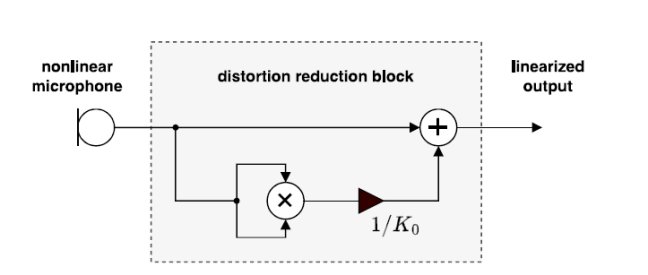
A couple of French scientists have developed a method to compensate for the mic distortion which is predominant 2nd harmonic.
They developed an algorithm that basically is to add to the mic signal a factor V^2/K0 (V^2 is of course the 2nd harmonic of the signal).
If you can find K0 with some accuracy, the 2nd can be decreased up to 40dB which is an important improvement.

So my plan was to use REW's Trace Arithmatic to develop V^2, divide that by a constant K0 and add that to the original signal.
I am very, very curious what the result will be!
My immediate worry is that I am pretty new to REW (last used it a decade or more ago) and I have no idea how to manipulate traces.
I mean, I'm here staring at the RTA spectrum, and now what? How to save that, in what format, then load that into a Trace arithmatic slot.
Probably load the original trace in both A and B then execute A*B. Then divide that by K0 (K0 is expected to be between 5 and 10, I'm still working it out).
Then add that to the original trace and look at that spectrum, hopefully with much decreased IM compared to the orinally measured trace.
It sounds so simple, I know!

Jan
 

Attachments

  • fig 5.png
    fig 5.png
    19.4 KB · Views: 2
Back
Top