Measuring Audio Glasses (Left Mic Freq, Mic Echo, Left Speaker Freq, THD)

Sikr19ee

Registered
Thread Starter
Joined
Nov 26, 2025
Posts
9
I am working on measuring audio smart glasses inside a small acoustic test chamber.
My goal is to generate four graphs:
  1. Left Speaker Frequency Response
  2. Left Mic Frequency Response
  3. Mic Echo / Impulse Response
  4. Left Speaker THD

I need Help in Generating these graphs For My test
 
This is not a trivial exercise. You will need special test equipment and the ability to dismantle the glasses to test the mic and speaker responses independently.

For the mic, it's not only the frequency response which is important, it is also the polar response.

For the speakers, you will need a headphone test fixture like the MiniDSP EARS (if you are a hobbyist) or a B&K 5128 (USD$40k) if you need industry standard measurements.

So the question is: who are you, and why do you want to know? If you are an engineer, you should probably already know these things. But if you are a hobbyist, the exercise will be too difficult for you.
 
This is not a trivial exercise. You will need special test equipment and the ability to dismantle the glasses to test the mic and speaker responses independently.

For the mic, it's not only the frequency response which is important, it is also the polar response.

For the speakers, you will need a headphone test fixture like the MiniDSP EARS (if you are a hobbyist) or a B&K 5128 (USD$40k) if you need industry standard measurements.

So the question is: who are you, and why do you want to know? If you are an engineer, you should probably already know these things. But if you are a hobbyist, the exercise will be too difficult for you.
  • I am a hardware engineer, not a hobbyist.
  • I already have a dummy head ear simulator setup (not free-air testing).
  • My requirement is simply to generate repeatable engineering measurements for internal development.
What is the correct procedure within REW to
• calibrate input/output levels
• run sweeps through the glasses
• capture mic FR
• capture speaker FR
• capture THD
• capture impulse/ETC
 
Please refer to the REW help index and the free REW eBook (you want Book 2) for general questions about how to use REW and how to interpret measurements.

What is the correct procedure within REW to
• calibrate input/output levels

REW check levels procedure

• run sweeps through the glasses
• capture speaker FR

Taking sweeps with REW

• capture mic FR

This will be more difficult. You will need (1) a calibrated omnidirectional microphone, (2) a speaker with a known flat anechoic response, (3) an audio interface, (4) some way to connect your mic to REW through the same interface. This is the procedure:

First, create the reference measurement:

1. Using a loopback timing reference, and your microphone at 1m from the speaker under anechoic conditions, sweep the speaker.
2. In REW, apply 1/6 or 1/12 smoothing.

Now measure the DUT:

3. Using a loopback timing reference, and your DUT at the exact same position from the speaker under anechoic conditions, perform a sweep.
4. In REW, apply 1/6 or 1/12 smoothing.
5. Align the two impulses using the loopback reference and do Trace Arithmetic A/B (A = DUT, B = reference).
6. Repeat the procedure for different angles of incidence to obtain a polar map.

• capture THD
• capture impulse/ETC

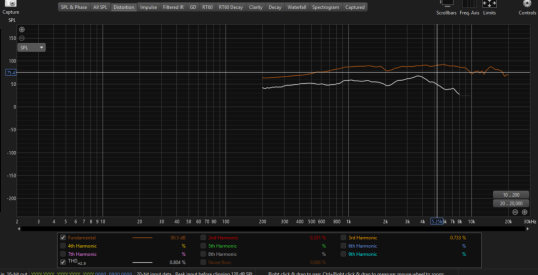
REW Distortion measurement. Note that you are better off using a stepped sine wave to measure distortion, as per the REW manual.
ETC is in the "Impulse" tab. Click on ETC and change the view from % to dBFS.

 
Screenshot 2025-11-26 182306.png
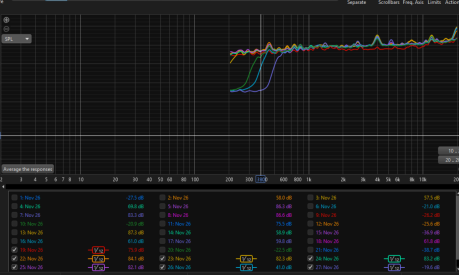
I am Getting Graphs Like this the Analyzer i am Using is from Audio array
 
You need to provide more context into what you are measuring, how you set up your measurement, whether you loaded a calibration file, what mic you are using, how you pointed the mic, and so on. All I can see is a bizarre looking upward curve. All this is described in Book 2 of that eBook I linked. Without any context, it is impossible to interpret the measurement.

And your graph is way too zoomed out to see anything. It is better to post the MDAT than a screenshot.
 
I am Measure the Speaker Freq of My Audio Glasses , I am Using Audio Array AI 04 analyser , Behringer ECM800 Mic , Yes i have Loaded The calibration file of MIC , My Mic is Around 45 degree Angle to the Glasses Speaker , Sweep Level is -12dB , Input is Audio Array MIC input and Output is the Bluetooth Device ( Audio Glasses ) , And when I am measuring These Are the Graphs I am getting
 

Attachments

  • Screenshot 2025-11-26 181632.png
    Screenshot 2025-11-26 181632.png
    247.4 KB · Views: 11
Latency can be an issue with Bluetooth connections, turn on the acoustic timing reference option on the Measure dialog to counter that if the glasses can reproduce a high frequency sweep. Alternatively if your main interest is the response shape you could use the RTA and pink periodic noise. RTA settings are shown in the linked help.
 
Please make sure you read and understand the replies before you make any more posts.

1. If you want to measure the FR of your glasses speakers, you need to measure using a HEADPHONE TEST FIXTURE. NOT an omnidirectional microphone. This means that the microphone is located inside an ear canal of the headphone fixture. The purpose of the omni mic is to see the deviation of the mic on your glasses from flat. It is NOT to measure the FR of the speakers.


1764241380230.png


This is a cross-section of a B&K 5128. You can see the microphone is located where the eardrum would be.

If you simply take an anechoic measurement of your glasses' speakers, it will not take into account the HRTF and the measurement would be unrepresentative. In fact, even if you had a B&K 5128 it would be devilishly difficult to take consistent, repeatable measurements of your speakers. People already have trouble taking consistent measurements of IEM's and headphones because variations in seal quality, clamping pressure, etc. which means the measurements have poor repeatability. It is common for people to repeat measurements 10x or more to ensure they are not looking at an outlier.

For speakers built into glasses, it would be even more difficult to take consistent and repeatable measurements. You said you have a dummy head simulator. Why aren't you using it to take measurements of the speakers? Which one do you have?

2. You have cut off the vertical scale from your last post AND you are still not zooming in properly. I can tell the vertical scale is still too large.
 
Just to provide some additional input, smart glasses are typically quite different from headphones or IEM, in that there is no direct coupling to the ear. So there is no "sealing issue". Although the speaker is close to the ear (2.5-5cm) this distance is far enough that the free field "target curve" would be essentially flat - with EQ for user preference and to potentially dynamically compensate for the limited output capabilities at lower frequencies. The Bose Frames, for example, have a fairly flat frequency response measured at 3.5cm on axis free field with lower output levels, but as the output increases they progressively roll off the lower frequencies to prevent damage.

My thought would be that free field measurements of the smart glass speaker at the ear distance position would be quite informative of the system response.

A "small acoustic test chamber" may not provide a sufficiently free field environment to test down to the 100-200Hz range without response anomalies. It might, however, be possible to calibrate/compensate for these anomalies if a free field measurement is used as a reference.
 
I am trying to measure THD and Echo of a Bluetooth microphone (from my glasses) using REW along with the Audio Array analyzer.
My setup is:
  • Bluetooth microphone from the glasses connected to my laptop (as the REW input device)
  • Audio Array interface connected to my laptop (as the REW output device)
  • Audio Array output feeding a test speaker inside an acoustic chamber
The issue is that when I run a sweep in REW, no signal is played through the speaker unless I switch REW’s output to my laptop’s Bluetooth audio. But if I do that, the Audio Array interface is no longer in the signal path, and I cannot perform any proper measurement.

Can you please tell me how to configure the Audio Array analyzer so that:
  1. REW can use the Audio Array interface as the output device to play the sweep.
  2. The sweep is correctly routed from the Audio Array output to my test speaker.
  3. REW can simultaneously use the Bluetooth microphone as the input device.
  4. REW can still run a synchronized sweep for distortion and echo measurements in this dual-device setup.

Please advise on the correct routing, driver settings, or any required configuration for this setup.
 
The issue is that when I run a sweep in REW, no signal is played through the speaker unless I switch REW’s output to my laptop’s Bluetooth audio.
That would suggest your speaker is configured to use its Bluetooth connection as its source rather than the signal from the Audio Array interface.
 
Before switching to Bluetooth, I first tried connecting the Audio Array analyzer’s output to my test speaker using an AUX/analog cable. Even after selecting the correct input and output devices in REW’s Preferences, no sound was coming out of the speaker when I played the sweep
Because of this, I changed the setup so that both the speaker output and the microphone input were connected via Bluetooth. In that configuration, the sweep audio plays and the microphone input appears to be detected, but the measurement graphs are not coming out correctly

I need guidance on why the analyzer’s AUX output was not producing sound, and whether REW can properly measure when both input and output are routed over Bluetooth
 
Even after selecting the correct input and output devices in REW’s Preferences, no sound was coming out of the speaker when I played the sweep
Did you select the correct output channel? Were the OS and interface volume settings correct? Use the REW signal generator to play a tone and correct your settings so that it can be heard from the speaker.
 
Back
Top