Channel setup

Labdoc

Registered
Thread Starter
Joined
Oct 29, 2017
Posts
4
Location
Canada
Newbie question. On Audiolense XO 7.5, I am trying to setup to create and measure a 6.2 digital crossover system. On each side, there is a Subwoofer, Woofer, Mid-range and Tweeter channel with a dedicated amp channel on each output.. Input to each channel is via a RME ADI-2 pro fs be with 8 channels output using ASIO. The channels are connected as:
0,1 Left, Right subs
2,3 L, R woofers
4,5 L,R mids
6,7 L,R tweeters

I cannot see how to enter this setup into the Audiolense channel measurement setup interface. Help please.
 
Berndt, that is what I understood from Mitch's walkthrough article from several years ago and in the manual. However, I cannot find where I can re-assign the output channels. Can you post a screen shot?
Murray
 
I am at my phone now, so no screendump.

Just press «new measurement» and edit the outputs as you want. The numbers in the left side…
 
Found it! It is in Edit Speaker Setup.
Setup 6.2
Edit speaker setup
Remove all speakers
Speaker 0 remains
Add speaker 1 as Custom
Remove speaker 0
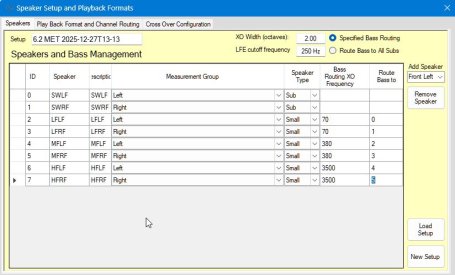
Continue to add custom speakers. Set crossovers and routing according to your system. For starters, I am using the manufacturer settings for the original passive XO, now removed: 70, 380 and 3500

Screen shot attached.
 

Attachments

  • 2025-12-27 13_30_10-Speaker_Routing.jpg
    2025-12-27 13_30_10-Speaker_Routing.jpg
    66.2 KB · Views: 3
Back
Top