




What can I glean from my mdat and how to make decisions on what to do next

HiImJeff

New Member
Thread Starter
Joined
May 13, 2026
Posts
13
Hi

Thx for the help in the other thread; I figured as this is a diff convo, a new thread was warranted.

New mdat below. I got rid of the low end null, Ok, not entirely, but a good portion of it. How? I moved the mic in a bit. I am thinking about 8 or 9"? I realized that although the mic was equidistant to the tweeters, forming a perfect triangle, that's not where I sit. I am actually in a bit further, and positioned the mic there.

Looking at the mdat, the waterfall, the decay, etc... it looks good to me, but I really do not know what I am looking at. Is there any way to look at the data, and be able to say say, ok, more treatment here, this type of treatment there?

Thanks again. :)
 

Attachments

K, so I read those sections. I now have a better understanding of how to read the displays. But I am still wondering how to use the measurements and turn them into where/how to further treat my room.

Thank you.
 
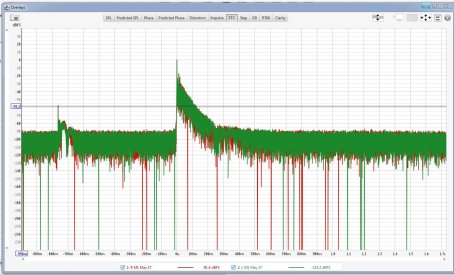
Which loudspeakers were tested? Looking at the ETC (Engery Time Curve, to be found in the overlays window): Where does that reflection at 1ms (or 34cm) come frome?
 
Last edited:
Which loudspeakers were tested?

Dutch & Dutch 8C

Where does that reflection at 1ms (or 34cm) come frome?

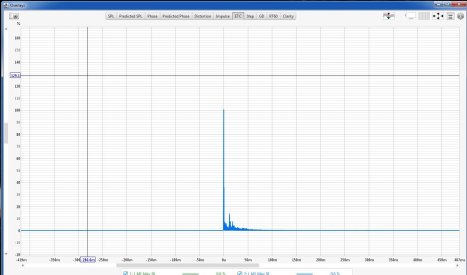
Below is a shot of the ETC. I don't see what it is you are speaking of. Not that I would be able to answer that anyway, i don't think.


etc.jpg
 
That ETC is waaaaay too zoomed out. It's like asking me to count the holes in swiss cheese via a photo taken from a satellite. Anyway, this is what he is talking about:

1779769651509.png


An early and loud reflection at 1ms like that usually suggests either poor speaker placement or measurement error. For example, if you place your speakers right up against the side wall, you will get an early and strong reflection. Or it may be a reflective surface very close to the microphone, e.g. if you perched your mic on your chair with a mini tripod, or your mic is right up against the rear wall, etc.
 
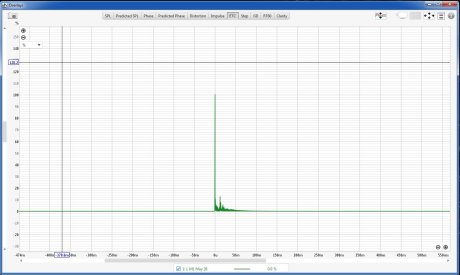
Using the % scale (upper left corner of graph) and zooming in by pressing left and right mouse buttons simultaneously makes it even more easily visible:

1779803610676.png


The graph indicates that there is something reflective there. Given the magnitude (34% of the main pulse's energy), I expect the localization accuracy to be significantly reduced. Have a look at the phase: Chaos starting at 2.57 kHz. Seeing that I'd suppose frequency respone is forcefully hammered as flat as possible by DSP, as I'd expect significant dips occuring at 500 Hz, followed by further dips at 1500 Hz and 2500 Hz.

The waterfall diagram shows a sawtooth pattern, most likely caused by comb filtering effects. Massive room mode @ 60Hz, the range below that isn't exactly nice also.
1779803459894.png


I am far from being an expert and am curious to see whether my interpretations will be confirmed by someone more knowledgeable or not. And, btw.: Did you use your microphone's calibration file(s)?
 
Last edited:
Thanks.

Tho I have tried, I can not get the ETC page to look like that ^

"poor speaker placement"

I would say that is def not the case.

"measurement error"

Ok, but how?

"speakers right up against the side wall"

No - they are centered.

"a reflective surface very close to the microphone"

My desk? It is covered in Neporene, but does have a keyboard on top of it.

"if you perched your mic on your chair with a mini tripod"

The mic is on a stand, the stand is on the floor, the chair is in front of the mic, pushed under the desk. Should I move the chair?

"or your mic is right up against the rear wall"

No - it's centered.
 
I see that in your pic; I don't have that.
1779804667261.png


It appears only when you move the cursor to the upper-left corner of the graph.
 
My desk? It is covered in Neporene, but does have a keyboard on top of it.
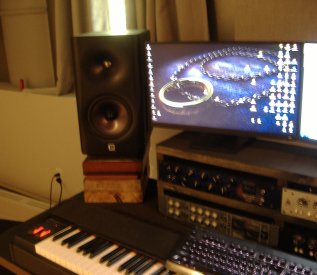
Place a thick, soft blanket on the tabletop and/or raise the speakers by stacking a few books underneath them, measure again, check the new measurements and draw your conclusions... A photo of your desk and it's environment would be helpful in assessing the situation.
 
Just look around your room. There is something that is about 30cm away from either speaker or microphone that is causing the reflection. I can't go through every permutation, it might be a vase, a cat, a piece of furniture, a vampire ... just use your eyes and look for it.
 
Well, I am NOT doing anything about the vampire...

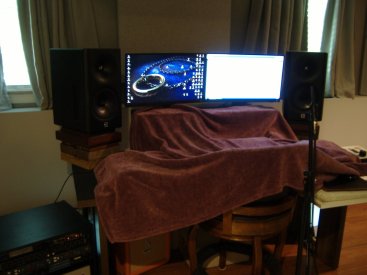
Two shots of with blanket and without - look the same to me. Green is w/blanket.

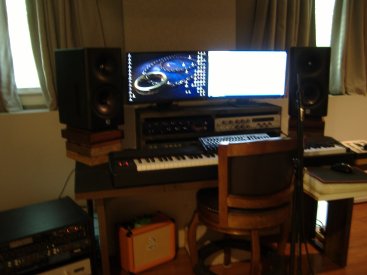
Then some shots of my desk (sorry for the not-so-great-quality). I don't see anything near the speaker, other than the monitor. I tried another measurement covering that monitor, but still the same. Thanks!

wob.jpg
wb.jpg

xtra.jpg wob1.jpg wb1.jpg
 
Well, I am NOT doing anything about the vampire...
I have a bunch of powerful demons here in my condo and I've never had any trouble with them, so I doubt a vampire would cause any either.

I see many sources of reflections and diffractions! Even world's best DSP will have a hard time correctly compensating for the strong reflections off these table and displays. Try that again with a more voluminous cover - what can be seen does not help much. And post the .mdat file(s)!
 
Last edited:
Back
Top