




Lexicon RV-9 Stock Microphone Calibration Files

Burakbekar

New Member
Thread Starter
Joined
May 2, 2025
Posts
3
More  
Preamp, Processor or Receiver
Lexicon RV-9, Lexicon LX-7
Main Amp
Lexicon RV-9
Additional Amp
Lexicon LX-7
Other Amp
Audiolab 9000A
DAC
Audiolab 9000N
Turntable/Cartridge
Audio Technica AT33PTG/II
Front Speakers
Monitor Audio Gold 500 6G
Screen
Projecta HD Progressive 1.1G
Video Display Device
Sony VPL-XW5000ES
Video Processor
Zidoo Z9X 8K
Hi,
I’m about to finish my home theater room and I’m currently working on calibration.

My setup is as follows;
  • Sony VPL-XW5000ES
  • Lexicon RV-9
  • Lexicon LX-7
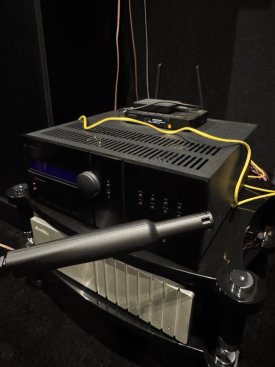
I connected both my RV-9 and my computer to the same network, and Dirac Live successfully detects the amplifier. However, I don’t have the original Lexicon microphone calibration file. It appears that Lexicon has removed the RV-9 from their website. I have already contacted Lexicon via email to request the RV-9 firmware and the microphone calibration file, but I haven’t received a response yet.

In this situation, would it be better to purchase a new measurement microphone such as the miniDSP UMIK-1, since its calibration file is easily available?

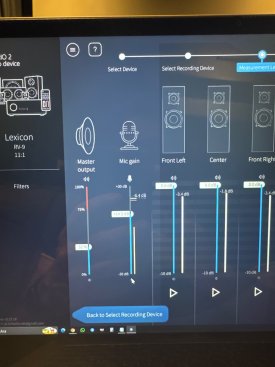
Additionally, I’m still getting familiar with Dirac Live calibration. In many YouTube tutorials, there is a red indicator bar in the microphone gain section. In the newer versions of Dirac Live, this indicator no longer appears, so I’m unsure what microphone gain level I should be using.

I would appreciate any advice or recommendations.
 

Attachments

  • IMG_1288.jpeg
    IMG_1288.jpeg
    299.4 KB · Views: 1
  • IMG_5C44740C-42F2-4291-B800-1CA15A90CB29.jpeg
    IMG_5C44740C-42F2-4291-B800-1CA15A90CB29.jpeg
    378.1 KB · Views: 1
In this situation, would it be better to purchase a new measurement microphone such as the miniDSP UMIK-1, since its calibration file is easily available?
It would be better to have a calibrated mic that you know is reading correctly. A UMIK would certainly work but may not be any better than your mic with a cal file for your purposes.

In the meantime, most mics seem to be reasonably flat to 6kHz(ish), so if you don’t correct beyond that you’re probably ok. Also, correcting beyond 500Hz can have a detrimental effect on sound quality, so you should at least try it and see what you think. Mics are also off in the low end, but you’ll be adjusting that to your preference anyway. Bottom line, no harm in practicing without a calibrated mic and you might be very close in the end.

Additionally, I’m still getting familiar with Dirac Live calibration. In many YouTube tutorials, there is a red indicator bar in the microphone gain section. In the newer versions of Dirac Live, this indicator no longer appears, so I’m unsure what microphone gain level I should be using.
The goal when setting levels is to have the measurement volume at least 20dB higher the noise floor (the noise level when nothing is playing). What the actual numbers are isn’t important so long as that difference is adhered to. The actual measurement volume should never be uncomfortably loud.
This said, if you’d like to use the UI and have it make the most sense, most rooms will have a noise floor around -50dB +/- 5dB and Dirac’s UI seems designed with this in mind, so with everything as quiet as possible, set the mic gain so you get a reading of -50dB to -47dB at the bottom of the mic gain slider when nothing is playing, Then play the test tone and see if when the volume is raised to where you’d have it for your normal loudish listening, the reading is at least -30dB or louder. Again, where it falls on the scale makes no difference as long as it’s at least 20dB or more above the as quiet as you can get things number.
Now that you’ve got the general concepts, follow these instructions to set Dirac’s volume calibration properly:
 
Back
Top